8 Best Dunning Software for B2B and Professional Firms (2026)


This guide reviews the best dunning software for accounting teams in 2026. Learn how modern tools automate collections, improve visibility, and reduce AR risk.
Dunning software automates the process of following up on overdue invoices: reminders, retries, escalation, and reporting. Most popular dunning tools (Chargebee, Recurly, Baremetrics, and Stripe Smart Retries) are built to recover failed credit card charges for SaaS subscriptions, a different problem than B2B invoice collection. For CPA firms, family offices, and businesses managing invoice-based receivables, the right tools include Gaviti, HighRadius, Invoiced, Tesorio, and Lunos AI. The right choice depends on invoice volume, whether you need it standalone or connected to your accounting system, and how much AI-driven prioritization you actually need.
Search "best dunning software," and most results point you toward the same handful of tools: Chargebee, Recurly, Baremetrics, and Stripe Smart Retries. Every one of them is built to solve a specific problem: recovering a declined credit card on a SaaS subscription renewal.
That's a problem, but it's not the one most accounting firms and family offices have. If your receivables are invoices, not recurring card charges, the retry-a-declined-card tools don't apply to your workflow at all.
This guide covers the software actually built for B2B invoice dunning, plus where the subscription-focused tools do fit if that's genuinely your billing model.
For the strategy behind dunning itself, including segmentation, retry timing, and escalation rules, see our dunning management guide; this article focuses specifically on the software.
What Are the Two Different Dunning Problems?
Before comparing tools, it's worth being precise about which problem you actually have. The two are frequently lumped together under "dunning software," but the tools that solve them are built completely differently.
If your business invoices clients and waits for bank transfers, checks, or ACH payments rather than charging a card on file, the subscription dunning tools are the wrong category entirely, as there's no card to retry.
CPA firms, family offices, and B2B professional services all manage invoice receivables, but their underlying operational risks diverge significantly:
CPA practices manage direct operational cash flow and client billing relationships, balancing fee recovery against future advisory goodwill.
Family offices manage complex collections across multiple legal entities, operating companies, and real estate SPV, where one entity’s delinquency must be isolated so it does not contaminate cross-entity relationships or distort consolidated liquidity.
8 Best Dunning Software Tools for B2B Invoice Recovery
Before we get into the details, here’s a quick comparison of our top recommendations.
1. Gaviti — Best for Full Accounts Receivable Automation
Gaviti is best for mid-size finance teams wanting full A/R automation, not just dunning.
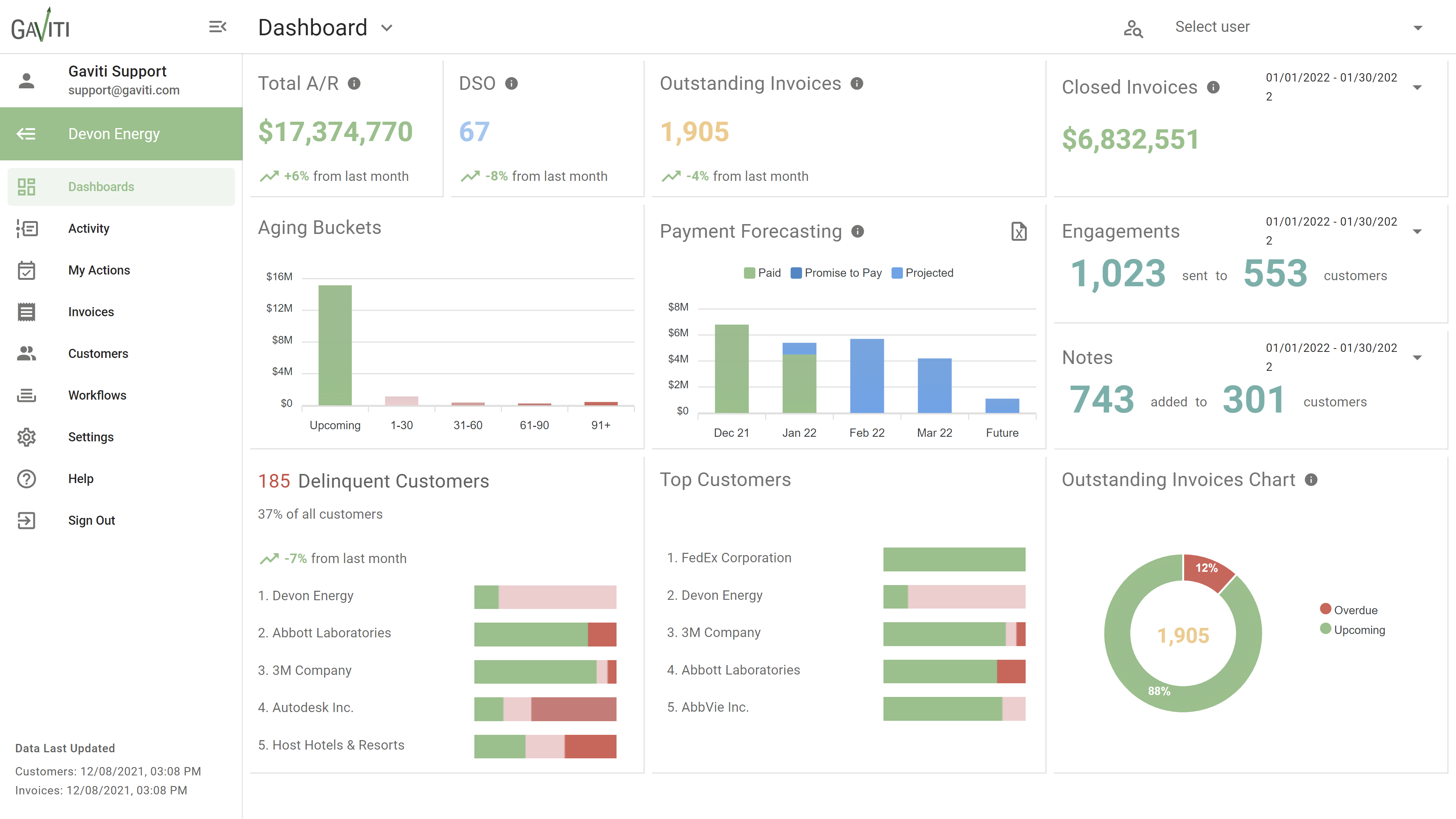
Gaviti handles the full invoice-to-cash cycle, not just dunning: collections, cash application, credit risk, and disputes in one workspace.
It's ERP-agnostic enough to connect with proprietary or homegrown systems, and a standout feature lets you describe a workflow in plain language and have Gaviti build the automation logic for you.
Key Features
- Plain-language workflow builder that generates automation logic from a written description.
- Zero-fee ACH payment portal included on every plan.
- Predictive analytics flagging accounts at risk of write-off.
- ERP-agnostic integration, including proprietary and homegrown systems.
Pros and Cons
Gaviti’s pricing is custom and usage-based. Unlimited users and workflows are included at every tier, and there are no per-seat fees. Implementation takes 4 months on average.
2. HighRadius — Best for Enterprise Receivables at Scale
HighRadius is best for finance teams with complex, multi-system receivables.
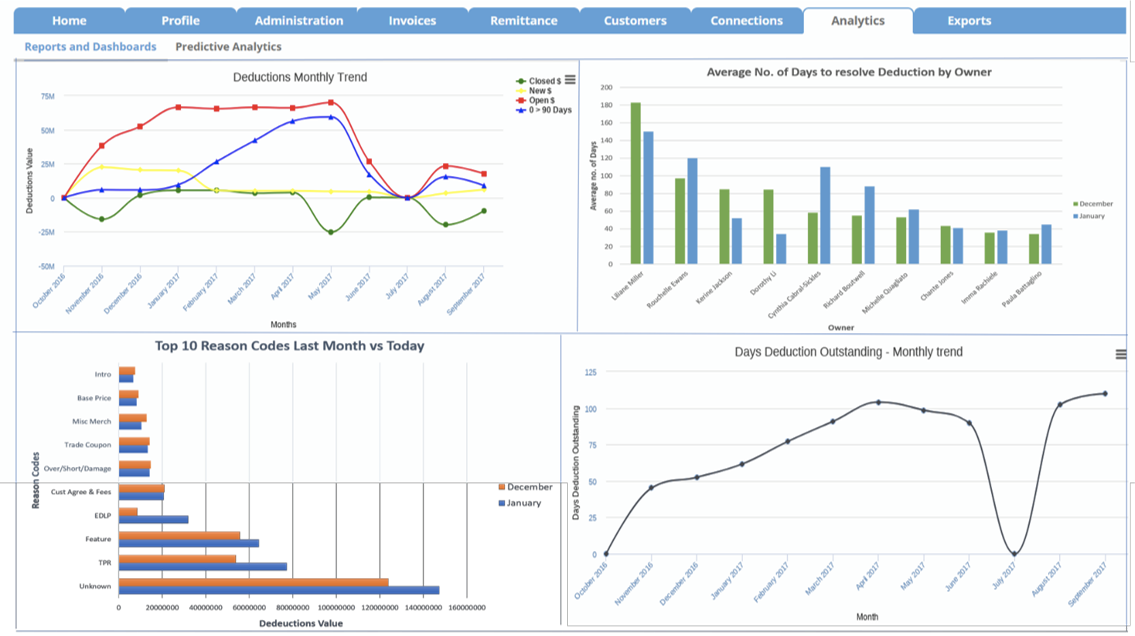
HighRadius is autonomous finance software spanning order-to-cash, treasury, reconciliation, AP, and payments, with collections and dunning as one motion inside that broader suite.
Agentic AI prioritizes collections worklists based on payment behavior and risk signals rather than a fixed schedule, and its ML-based cash application, automatically matching incoming payments to invoices, is the capability reviewers cite most often.
It's used by 1,000+ companies, including 3M, Unilever, and P&G, with deep native SAP and Oracle integration.
Key Features
- ML-based cash application that automatically matches incoming payments to invoices.
- Agentic AI collections prioritization based on payment behavior and risk signals.
- Native SAP and Oracle integration for large enterprise ecosystems.
- Full order-to-cash suite spanning treasury, reconciliation, and AP alongside AR.
Pros and Cons
HighRadius follows a custom SaaS subscription model with no published rates. Implementation takes 8 months on average, whereas the ROI average is around 6 to 9 months.
3. Upflow — Best Mid-Market Modern Purpose-Built AR Platform
Upflow is best for B2B finance teams wanting a modern, purpose-built AR platform without enterprise weight.
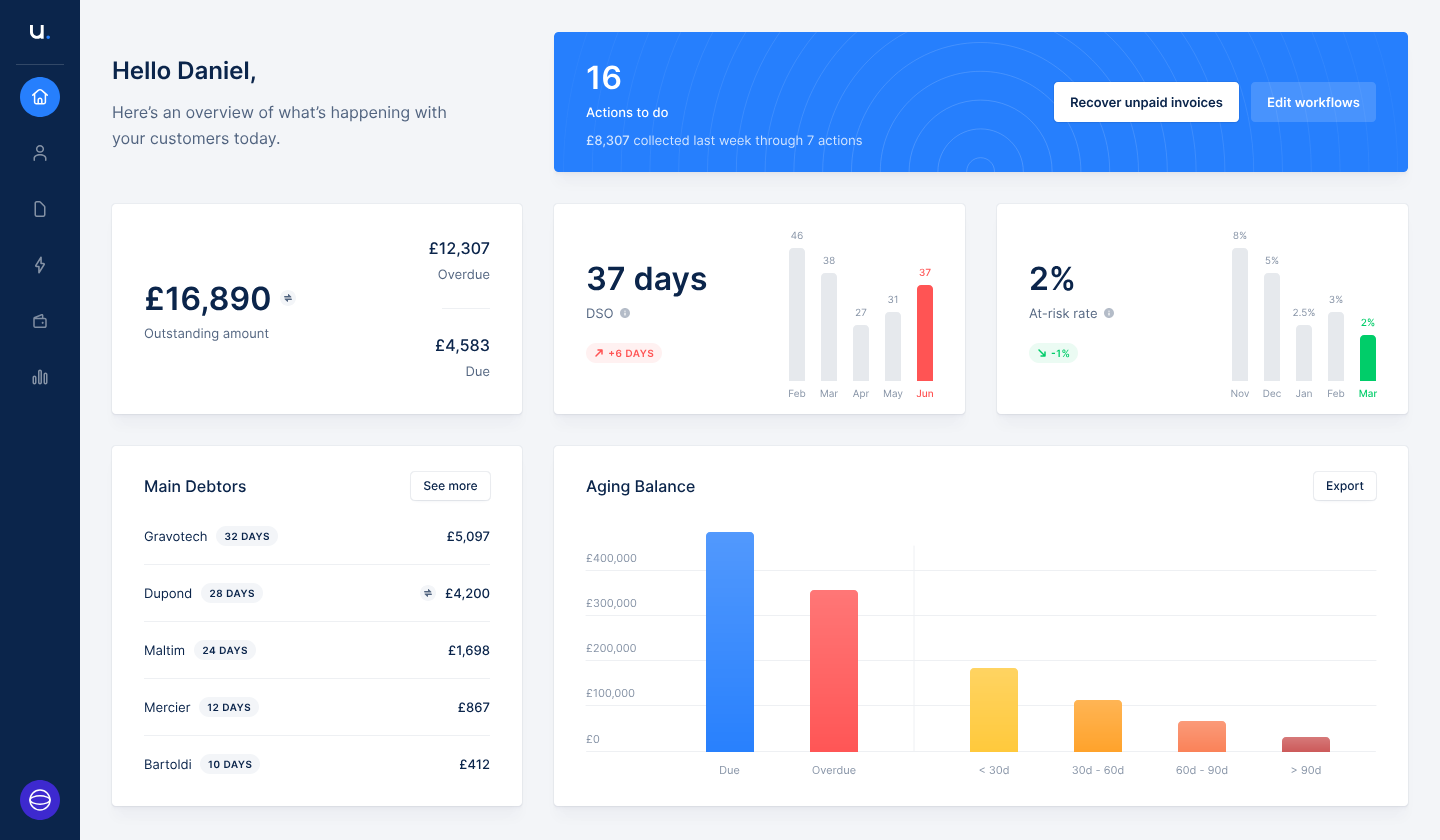
Upflow is built specifically for B2B finance teams, not adapted from a subscription-billing or enterprise ERP tool.
It automates collections, cash application, and payment processing; connects to the ERPs and billing tools B2B teams already run; and uses AI to surface which accounts need attention while leaving the final call to your team.
Key Features
- AI-drafted outreach tailored per customer, reviewed and sent by your team, not fully autonomous.
- Real-time dashboards for DSO, CEI, and aging balances.
- Connects to Stripe, QuickBooks, Xero, Chargebee, HubSpot, and Salesforce.
- SOC 2 Type II attestation covering security, availability, and confidentiality.
Pros and Cons
Upflow offers flexible pricing tied to your organization’s needs. Market estimates place it around $15,000 to $50,000 per year, depending on volume and integrations. Request a quote scoped to your invoice volume.
4. Versapay — Best Collaborative AR Platform for Mid-to-Large Companies
Versapay is a great option for mid-to-large companies wanting a collaborative AR platform with a self-service buyer payment portal.
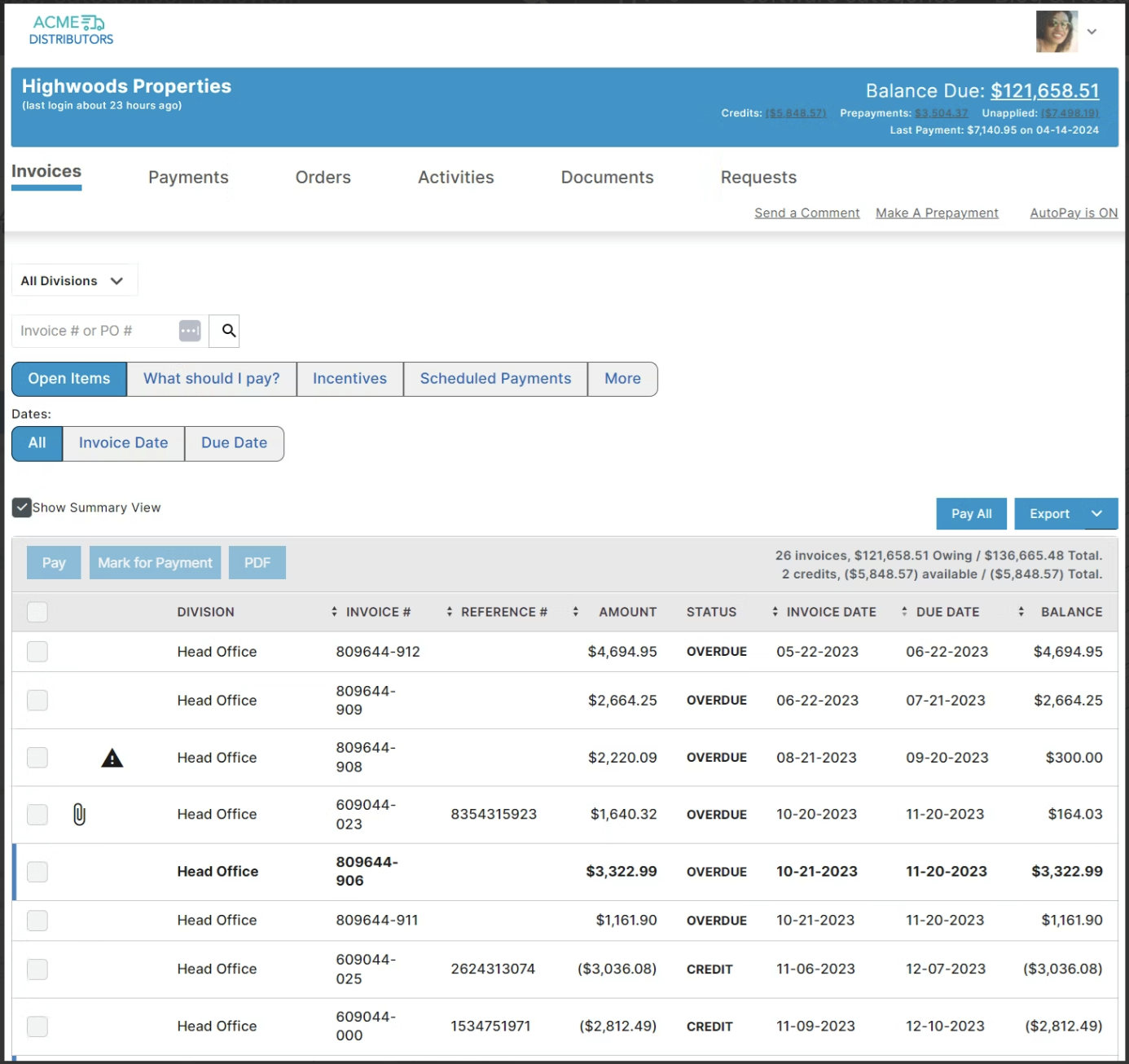
Versapay centers its platform around collaboration between finance teams and the customers paying them, with a payment portal buyers can self-serve through rather than routing everything through your team.
It's used by over 10,000 customers processing more than $300 billion in payments annually, and it integrates with NetSuite and Sage Intacct specifically, which matters if either is already your GL.
Key Features
- Self-service buyer payment portal reducing inbound payment questions.
- Cash application module for automated payment-to-invoice matching.
- Native NetSuite and Sage Intacct integration.
- Reported 80% customer adoption rate, the highest cited in the category.
Pros and Cons
Versapay’s pricing is quote-based and takes into consideration network usage, user count, and transaction volume. There’s no published starting price.
5. Growfin — Best for Enterprise NetSuite Users
Growfin is the ideal dunning software for enterprise NetSuite users with large, complex AR backlogs.
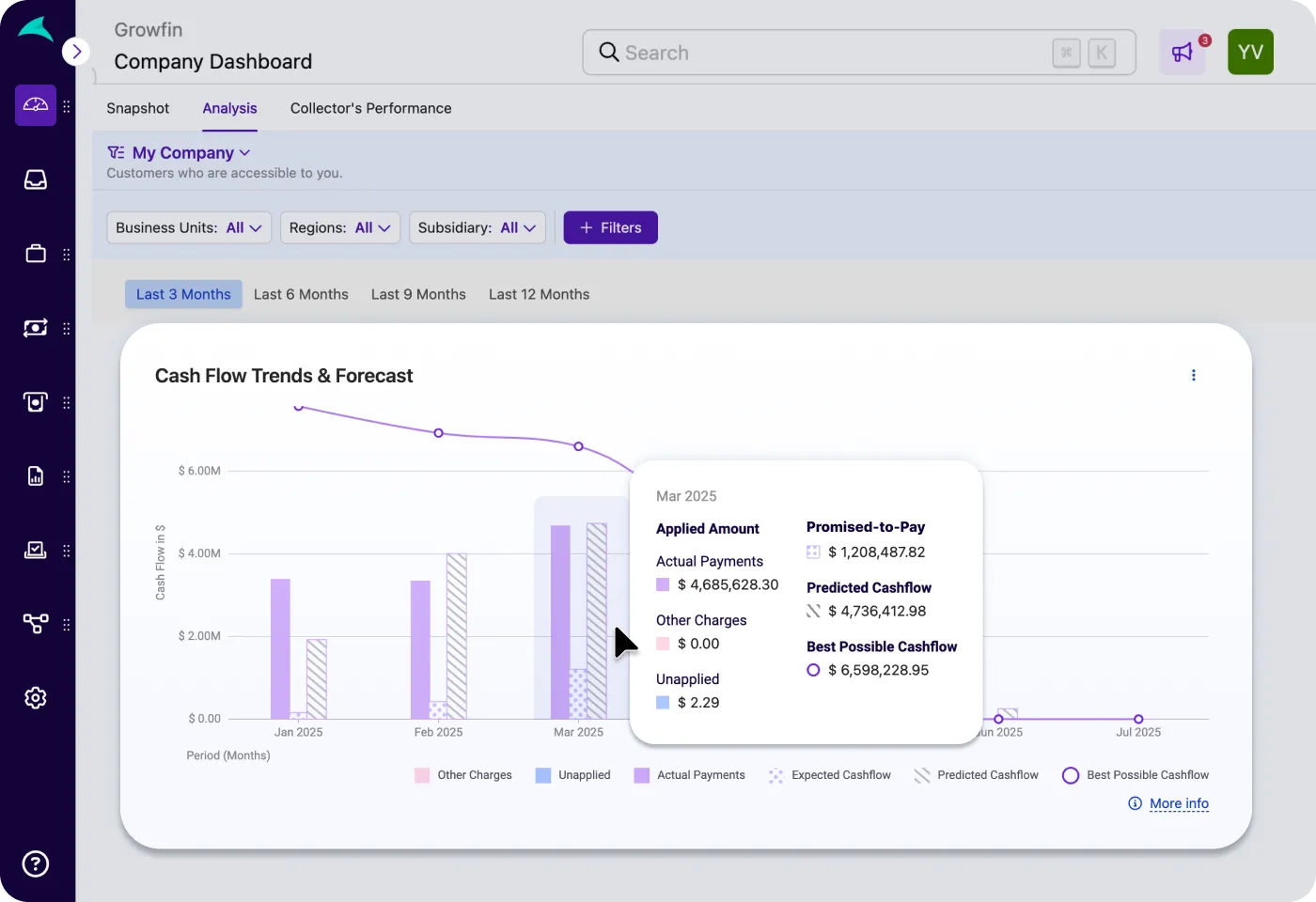
Growfin markets itself as a finance CRM, with deep NetSuite integration as its primary differentiator. It's built for enterprise brands managing sizable AR backlogs, with strong payment-delay prediction and cash flow forecasting layered on top of automated follow-ups.
Key Features
- Deep, purpose-built NetSuite integration.
- Payment delay prediction and cash flow forecasting.
- Real-time DSO and outstanding-vs-collected tracking on the main dashboard.
- AI-assisted cash application and reconciliation.
Pros and Cons
Growfin’s pricing is quote-based, but setup fees and an upfront fee are expected, plus additional charges based on additional revenue. Confirm current terms directly, as this reflects one publicly cited customer account rather than a published rate card.
6. Invoiced — Best Dedicated B2B A/R Cloud
Invoiced is best for B2B teams wanting a dedicated A/R cloud without enterprise implementation weight.
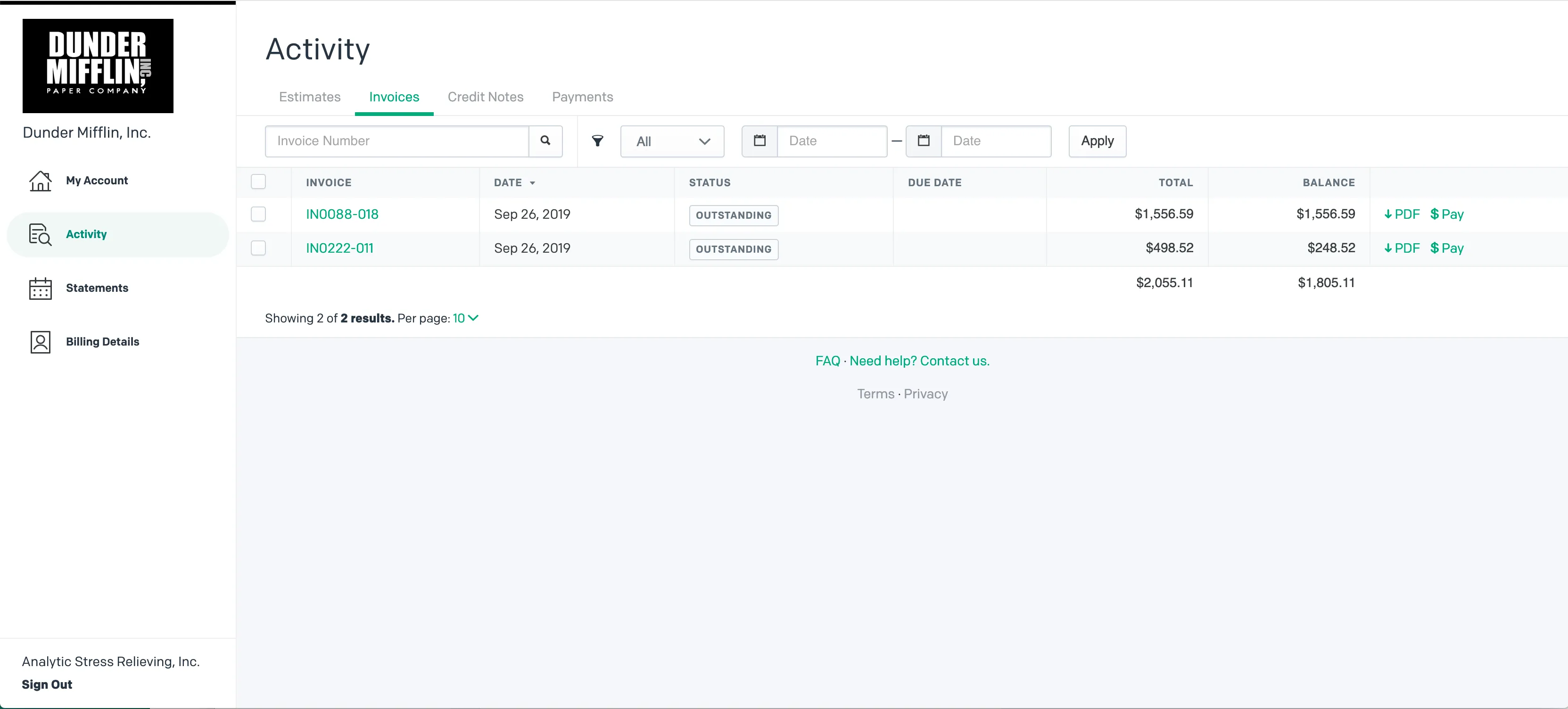
Invoiced is built specifically around B2B invoice-to-cash: automated multi-channel reminders across email, letter, and text-to-pay; a seamless client payment portal supporting card and ACH; and integrated reporting across the full receivables cycle.
It aims to shorten the time between invoicing and cash in hand without requiring an enterprise-level implementation, making it the more accessible middle ground between lightweight reminder tools and the heavier platforms above.
Key Features
- Multi-channel dunning sequences: email, letter, and text-to-pay.
- Client payment portal supporting card and ACH.
- Integrated reporting across the full receivables cycle.
- Faster time-to-value than enterprise-scale platforms.
Pros and Cons
Invoiced uses a custom quote-based SaaS subscription model scaled by user seats, monthly invoice volume, and ERP depth. Its typical implementation timeline is vastly faster than enterprise platforms, averaging 1 to 2 weeks.
7. Tesorio — Best for Dunning Tied to Cash Flow Forecasting
Tesorio is best for teams that want dunning tied directly to cash flow forecasting.
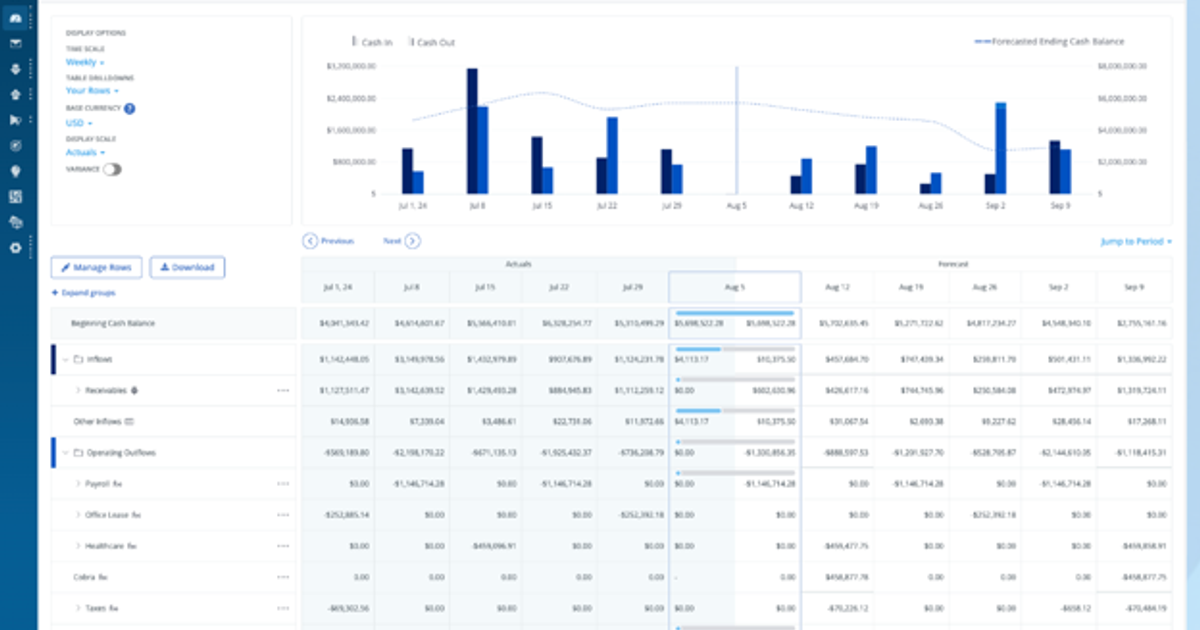
Tesorio's dunning sends reminders based on customer type and invoice age, but the differentiator is machine learning that predicts invoice-level payment dates and feeds that directly into a rolling cash flow forecast.
It's backed by Workday Ventures, a certified NetSuite partner, and used by GitLab, Plaid, and Notion.
Tesorio's vendor-published case studies report up to 30% DSO reduction, a 3x increase in collections efficiency, and a 75% reduction in bad debt write-offs (unverified metrics that depend heavily on baseline collection maturity).
Key Features
- ML-based payment date prediction feeding a rolling cash flow forecast.
- Native NetSuite and Salesforce sync.
- AI-driven collections prioritization.
- Published customer results: up to 30% DSO reduction, 3x collections efficiency, and 75% reduction in bad debt write-offs.
Pros and Cons
Tesorio’s pricing is quote-based. It typically costs from $30,000 to $150,000 (or more) per year depending on company size and modules, plus $10,000 to $50,000 for implementation, which takes around 2 months on average.
⚠️ Note: Tesorio is priced well above the invoice-volume-based tools on this list. It's the right fit when cash flow forecasting accuracy is the actual driver, not just invoice follow-up. If dunning alone is the need, this is likely more than necessary.
8. Lunos AI — Best for AI-Driven Client Communication
Lunos AI is best for B2B teams wanting an AI agent that reads replies and negotiates, not just sends reminders.

Lunos is a newer entrant built for the nuance of B2B receivables rather than the fixed-schedule reminders subscription dunning tools rely on. It reads customer replies, identifies payment promises and disputes, and adapts follow-up based on context, closer to how a human collections team member operates.
Three autonomy modes (Monitor, Suggest, and Act) are set per customer, and the platform is Slack-native.
Key Features
- Two-way conversational AI that reads and interprets customer replies.
- Three autonomy modes (Monitor, Suggest, and Act) set per customer.
- Slack-native approvals and daily summaries.
- ERP and CRM sync (QuickBooks, NetSuite, Salesforce, HubSpot).
Pros and Cons
Pricing
When to Choose Subscription Dunning Tools Instead
If your actual billing model is recurring card charges (SaaS subscriptions, membership billing, or recurring retainers charged to a card on file), the tools above aren't the right category. These are the following:
- Chargebee and Recurly, which are built around subscription billing platforms with dunning as a native retention feature.
- Stripe Smart Retries for businesses already processing payments through Stripe who want built-in retry logic without adding a separate tool.
- Baremetrics Recover, which pairs recovery automation with subscription analytics for SaaS-specific metrics.
Note: Most CPA firms and family offices don't bill this way; client engagements are typically invoiced, not charged automatically to a card. If that describes your practice, the B2B tools above are the right shortlist.
What to Evaluate Before Choosing Dunning Software
The most common failure mode with dunning software isn't choosing the wrong tool; it's deploying a sophisticated tool on top of unreliable accounting data.
If invoice statuses aren't accurately reconciled against bank data, dunning software will send reminders for invoices that are already paid or miss ones that actually need follow-up. The dunning tool is only as good as the receivables data feeding it.
Here’s what to keep in mind before you subscribe to any of these software:
Why Dunning Software Depends on Clean Data
Every dunning engine depends entirely on upstream ledger integrity: accurate open balances, reconciled bank feeds, and verified entity mapping. Layering automation over un-reconciled books reliably triggers false delinquency notices to paying clients.
- The multi-entity workflow in practice: Consider a family office running collections across twelve distinct operating entities. By maintaining real-time, SOC 2-compliant bank reconciliation in Eleven, dunning platforms like Gaviti or Tesorio trigger follow-ups strictly against verified unpaid balances, preventing embarrassing payment demands on settled invoices.
- Defensible audit trials: Centralized ledger records provide the historical aging telemetry and documentation required to substantiate ASC 326 (CECL) expected loss reserves during annual audit reviews.
Want clean, reconciled receivables data across every client entity? Start a free 7-day Eleven trial today. →
Frequently Asked Questions (FAQs)
What is dunning software?
Dunning software automates the process of following up on overdue payments, whether that's a failed subscription card charge or an unpaid B2B invoice. It handles reminder sequences, retry logic, escalation rules, and reporting on recovery outcomes.
The specific tools differ significantly depending on whether you're recovering failed card payments (subscription billing) or collecting on unpaid invoices (B2B receivables).
What's the difference between dunning software and accounts receivable software?
Dunning software focuses specifically on the follow-up and recovery workflow for overdue payments. Accounts receivable software covers the full lifecycle: invoicing, payment tracking, cash application, aging reports, and collections.
Many AR platforms (Gaviti, HighRadius, and Invoiced) include dunning as one module within a broader system, which is often more useful than a standalone dunning tool because it keeps invoice status and follow-up automation connected.
Is Chargebee or Recurly good for a CPA firm's dunning needs?
Generally no. Chargebee and Recurly are built for subscription billing businesses recovering failed recurring card charges. CPA firms and family offices typically invoice clients and collect via bank transfer, check, or ACH rather than charging a card on file automatically.
For invoice-based receivables, dedicated B2B tools like Gaviti, Invoiced, or Lunos AI are a better fit.
Does dunning software work if my accounting records aren't clean?
Not reliably. Every dunning tool depends on accurate upstream data: correct invoice amounts, reconciled payment status, and current client contact information. If invoice statuses aren't kept current against actual bank reconciliation, dunning software will send reminders for already-paid invoices or fail to flag genuinely overdue ones.
Clean, reconciled accounting data is a prerequisite for dunning automation to work, not an optional nice-to-have.
How much does dunning software cost?
Most B2B-focused platforms (Gaviti, HighRadius, Invoiced, Tesorio, and Lunos AI) use custom, quote-based pricing tied to invoice volume, feature depth, and integration requirements rather than published flat-rate plans. Subscription-focused tools like Chargebee and Recurly typically price based on billing volume or revenue processed.
Get a quote scoped to your actual invoice or transaction volume before comparing platforms; list prices rarely reflect what mid-market and enterprise deployments actually cost.