Full Xero Review With Updated US Pricing and Features (2026)
Home
/
Blog
/
Full Eleven Review for Accounting Firms and Family Offices (2026)
Full Eleven Review for Accounting Firms and Family Offices (2026)
Written by
Reviewed by
Eleven is an AI-powered accounting platform designed for firms managing multiple entities or currencies, offering automation, advanced reporting, and scalable accounting features.
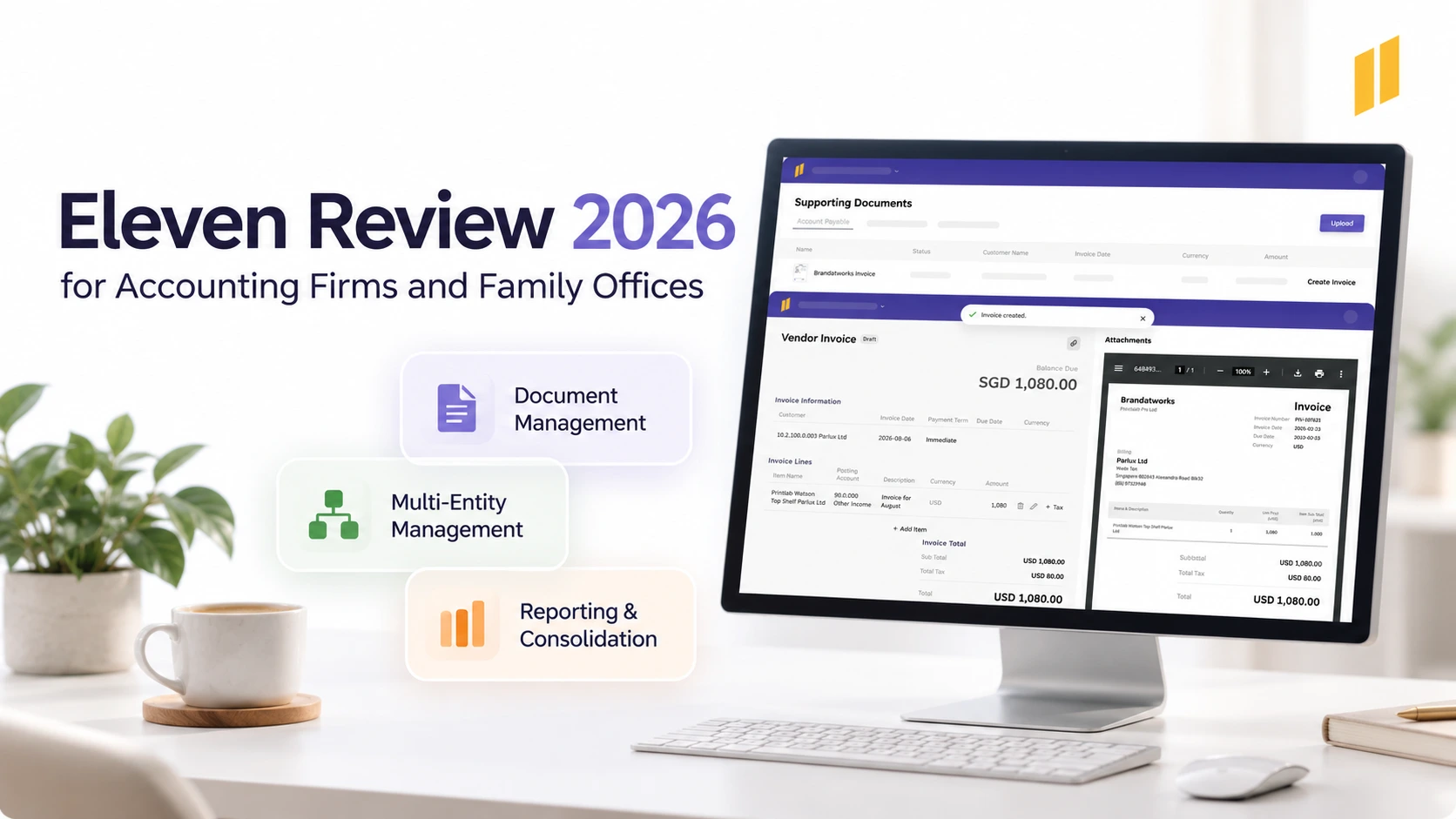
This Eleven review covers this accounting software’s most important features, including use cases, pros, and cons. This tools is the perfect addition for your CPA firm or family office. Let us tell you why.
Eleven is cloud accounting software built for accounting firms and family offices managing multiple entities.
It helps your team spend less time entering data, with AI tools that extract information from invoices and bank statements for accountants to review.
In this Eleven review, we look at how the platform fits into everyday accounting work and what customers say about using it. We also break down current pricing to see how the costs compare with similar options.
Disclosure: This guide is published by the team at Eleven. While we highlight how our platform solves workflow challenges based on our documentation and user feedback, we aim to provide an honest, practical look at where Eleven fits and where it might not.
What Is Eleven Accounting Software?
Eleven is cloud accounting software designed for accounting firms, bookkeepers, family offices, and teams managing multiple entities.
It combines the general ledger with invoice processing, document management, banking, currency handling, and reporting.
Rather than treating document capture as a separate task, Eleven connects the source material to the accounting records your team prepares and reviews.
That connection matters when work passes between colleagues. The person checking an expense needs more than an amount and an account code; they need to understand where the entry came from.
Eleven’s AI helps prepare that information. Accountants retain the review and approval responsibilities.
Subscriptions start at $35 per entity per month on an annual agreement, with unlimited users and volume discounts beginning at 10 entities.
Who Is Eleven Best For?
Eleven is a good fit when you have multi-entity accounting firms or offices and need different ledgers with multi-currency and multi-company support
- For an accounting practice, that might mean maintaining separate client books while giving preparers and reviewers a consistent working process.
- A family office may need to handle holding companies and special-purpose vehicles, each with its own transactions and reporting requirements.
Eleven makes more sense when several needs overlap.
A business with simple, single-entity books may need less of this breadth.
If your team coordinates accounting work across several entities, these capabilities can reduce the need to move between separate tools.
What Features Does Eleven Offer?
Eleven’s features follow the everyday accounting workflow, from receiving documents to reviewing entries and producing reports.
Multi-Entity Accounting
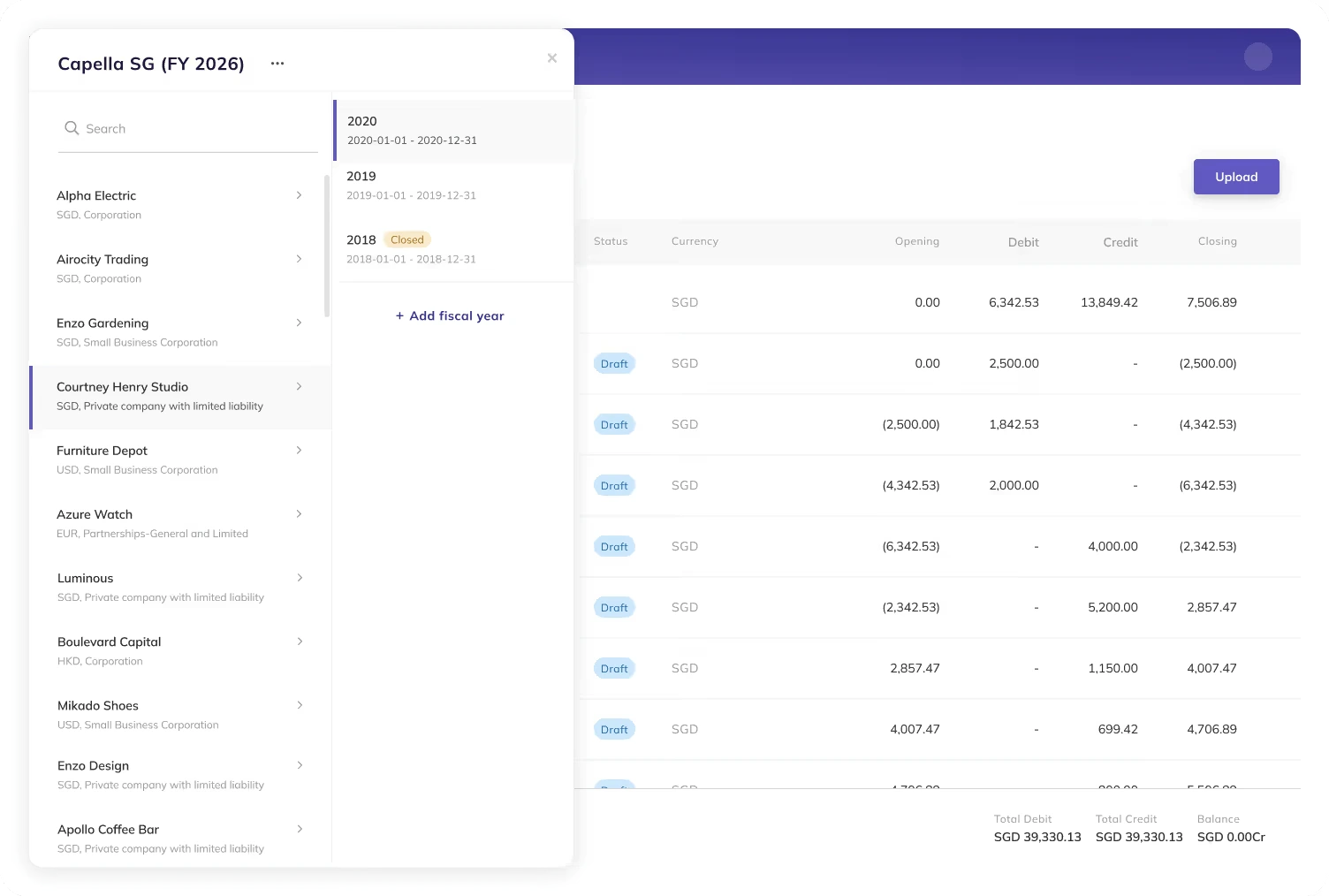
Eleven lets accountants work across separate entities while maintaining distinct books.
You can switch between entities within the platform and accommodate different charts of accounts and currencies. That gives a practice a common working environment without forcing every client into the same accounting structure.
Consider a team looking after a trading company, its holding company, and several unrelated clients. They all need bookkeeping, but only the relevant group belongs in consolidated accounts.
Multi-entity bookkeeping and consolidation serve different purposes. Eleven supports managing separate company ledgers from Standard, allowing accounting teams to work across entities without combining unrelated records.
- For group reporting, Eleven's API provides access to financial data from one or multiple companies. Accountants can use that data in Excel, Power BI, Tableau, or other reporting tools to prepare consolidated reports.
This approach gives teams flexibility over how they present and combine financial information. However, consolidation adjustments, such as intercompany eliminations and currency translation, still need to be handled appropriately within the chosen reporting workflow.
AI Invoice Extraction
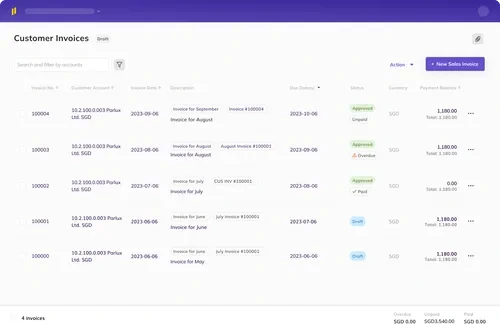
Eleven extracts invoice information from PDFs, images, and email attachments, including the vendor, date, amount, tax, and line items.
The AI workflow places extracted invoices in a review queue. Accountants can check and correct the information before confirming it.
Historical entries also inform coding suggestions for recurring suppliers. If the same supplier sends similar invoices every month, your team has less information to enter from scratch.
When evaluating invoice extraction, test the system with documents from your actual workload.
Include straightforward invoices alongside more complicated examples with multiple line items, unusual tax treatments, or inconsistent layouts. The exceptions will tell you more about the review process than a perfectly formatted sample.
Draft Journal Entries
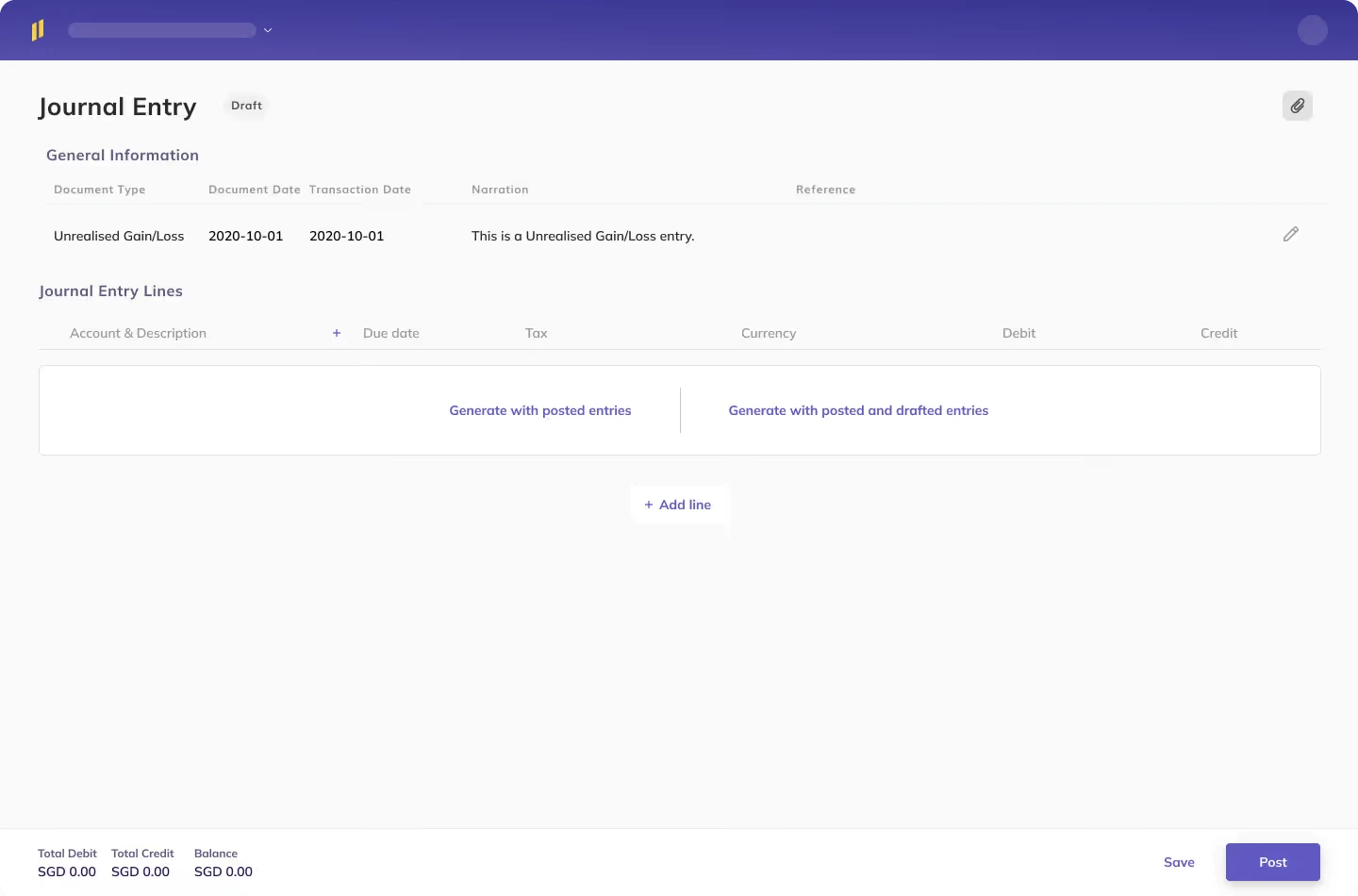
Eleven creates the associated draft journal entry alongside the invoice.
Once the accountant reviews and confirms the invoice, its entry posts to the ledger. This keeps the accounting record connected to the document being approved.
- For a reviewer, that means less time reconstructing the relationship between the invoice and its posting.
- For the preparer, it means fewer steps in completing the transaction.
The benefit is the connected workflow. Automatically generating an entry from an invoice is familiar accounting functionality; its usefulness depends on how easily your team can inspect and approve the result.
Document Management and Approval Controls
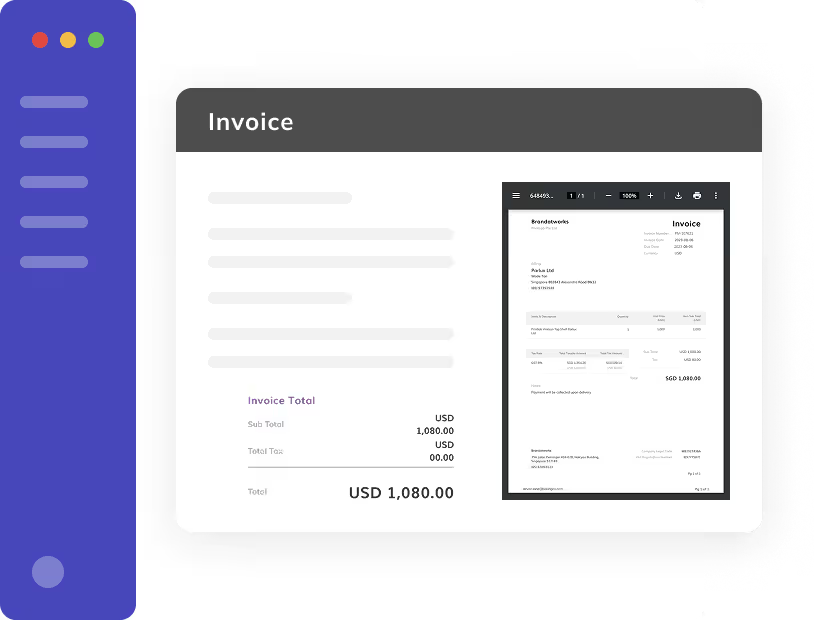
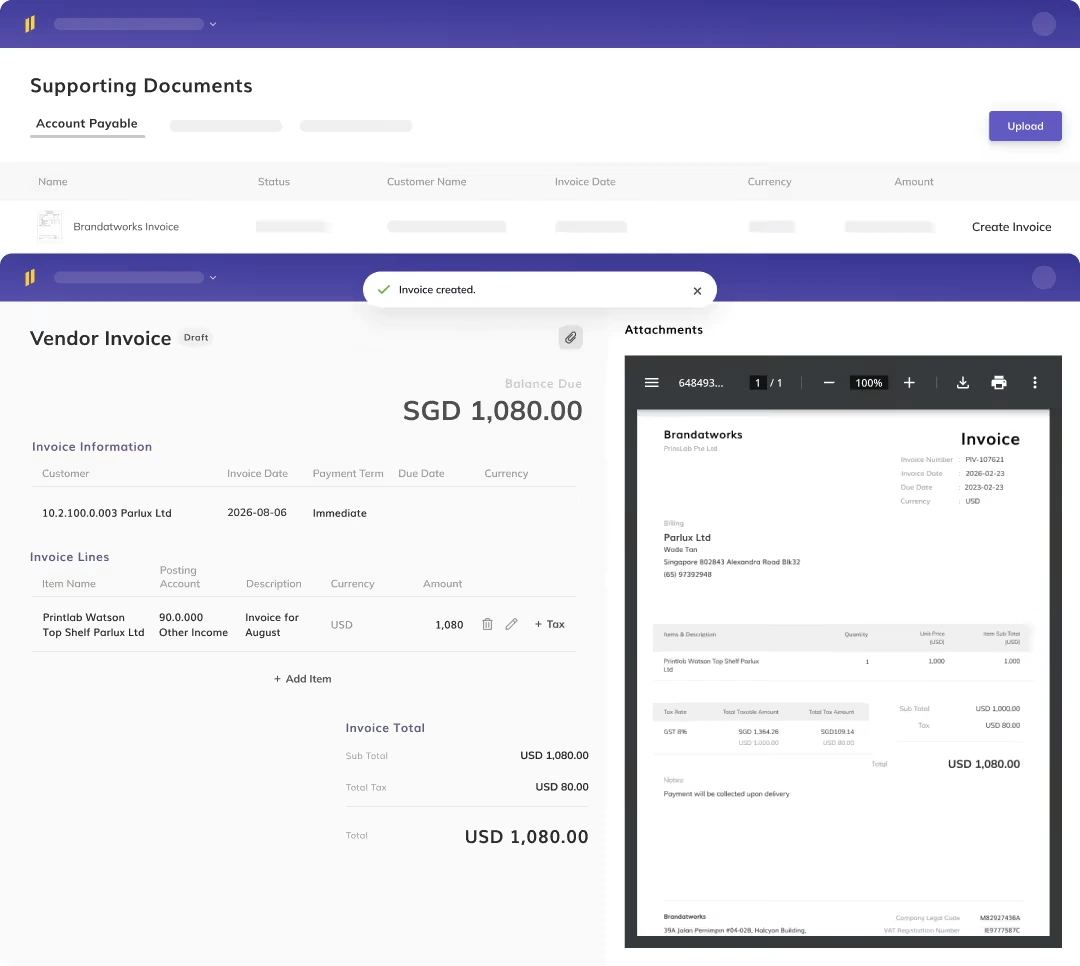
With Eleven, accountants can attach supporting documents directly to transactions, making invoices and other records easier to find during reviews or audits.
For example, if a manager questions an expense, the reviewer can return to the associated transaction and examine its supporting invoice without searching through a separate folder or email chain.
Standard includes document management and basic approval workflows, allowing teams to review extracted information before confirming entries.
Firms with more demanding control requirements may benefit from audit trail and compliance features under Enterprise, while custom roles, permissions, and advanced approval workflows are available as Enterprise add-ons.
Bank Feeds and Statement Extraction
Eleven provides bank feeds and statement extraction, giving teams different ways to bring banking data into the platform.
A supported direct connection can import transactions through a feed. PDF or image extraction helps when the bank statement is the available source, including private-bank workflows.
That second route is worth attention if your team regularly converts statements into spreadsheets before importing them.
Camelot’s Trust case study illustrates this workflow. They were manually handling hundreds of private bank statements each month. Reconciliations took an entire day, and manual data entry regularly led to errors and close-period bottlenecks.
After switching to Eleven’s statement extraction, the team cut bank reconciliation from a full day down to about 3 hours, reduced invoice processing time from 5 minutes to 45 seconds, and saved roughly 40 hours per accountant each month.
With an extraction accuracy rate around 98%, they eliminated the routine spreadsheet prep and shifted their focus back to client analysis.
Check direct-feed coverage for the banks and account types you use. Statement extraction expands your options, but it doesn’t establish that every institution has a direct connection.
Bank Reconciliation
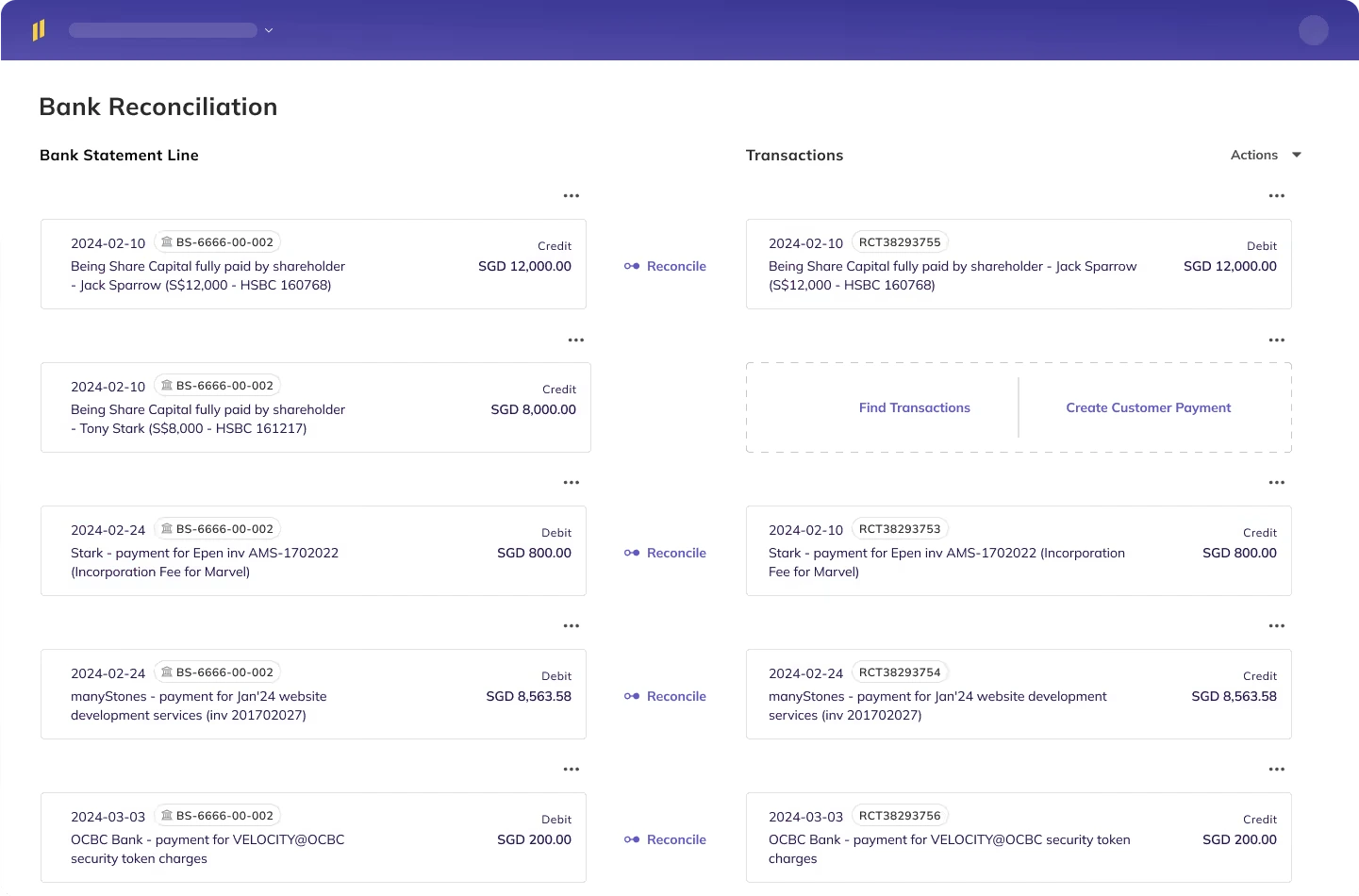
Eleven suggests matches between imported bank transactions and posted accounting records.
Accountants review those suggestions and handle exceptions:
- A straightforward receipt may be easy to confirm;
- A batched payment, reversal, or partial settlement can need a closer look.
The aim is to reduce the search involved in reconciliation while preserving the accountant’s decision.
Multi-Currency Accounting
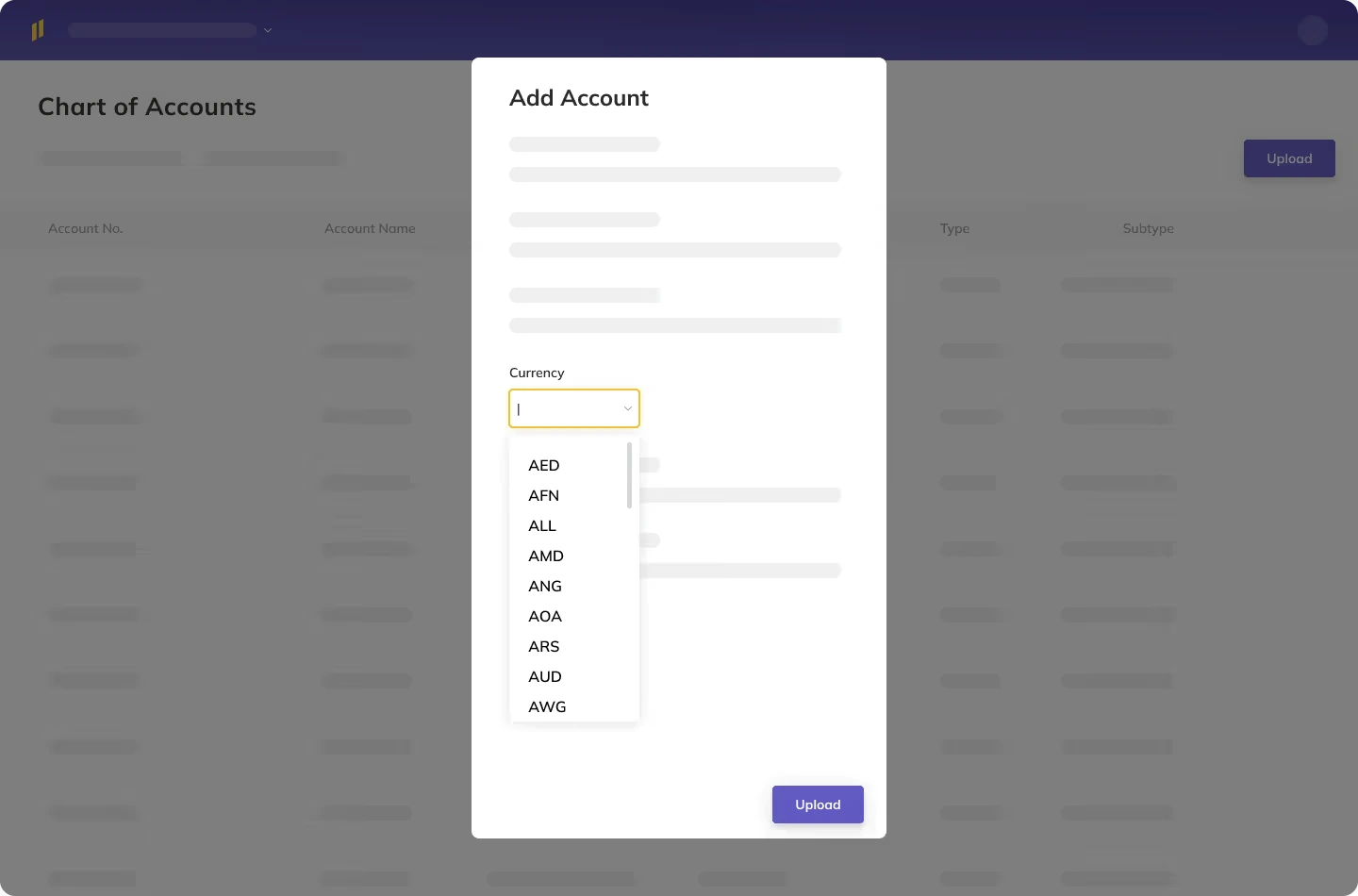
Eleven supports more than 170 currencies, with multi-currency accounting and FX revaluation included from Standard. It features exchange-rate updates, realized and unrealized foreign-exchange calculations, and period-end revaluations.
These tools help with recurring work around foreign-currency payments and outstanding monetary balances. For example, settling a foreign-currency receivable may create an exchange difference. An outstanding balance may also need revaluation at the reporting date.
Eleven supports foreign-currency revaluation using IAS 21-based calculations to help accountants prepare exchange-rate adjustments and draft gain or loss entries for review.
For US firms, ASC 830 is also relevant. Under both US GAAP and IFRS, the appropriate treatment depends on factors such as the entity's functional currency, the transaction or balance being measured, and the applicable exchange rate.
For example, a US company with a euro-denominated receivable may need to remeasure that outstanding balance at the reporting date. Eleven can help calculate the exchange difference and prepare an adjustment, but the accountant remains responsible for confirming the currency settings, applicable rate, and accounting treatment before posting.
Financial Reporting
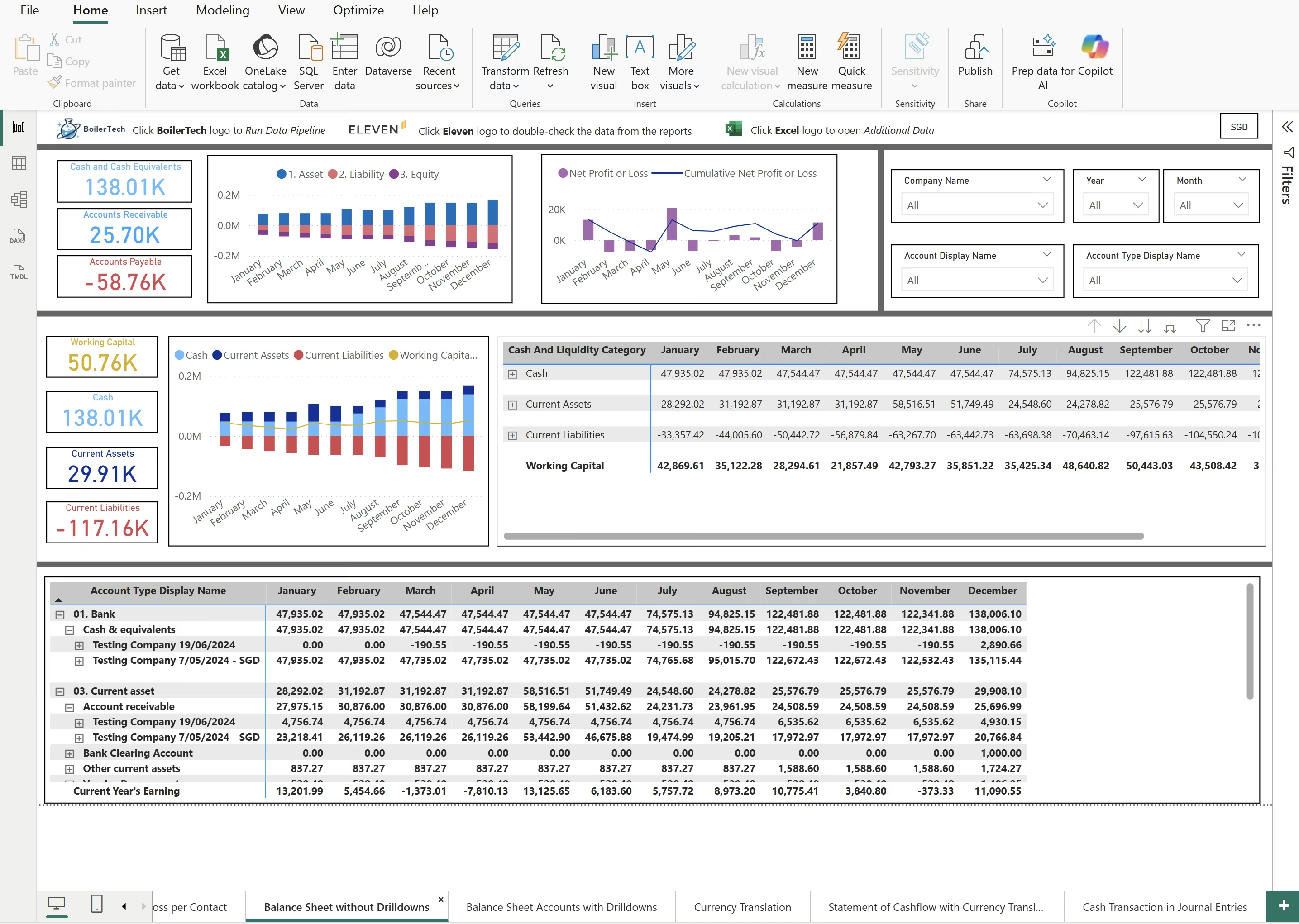
Eleven's Standard plan includes profit and loss statements, balance sheets, and trial balances. These give accountants the core reports they need to review an entity's financial position and operating results.
For more complex reporting needs, Eleven offers a custom report builder on Professional and API access to accounting data across companies.
Rather than requiring accountants to work with one specific reporting environment, the API allows teams to retrieve data from multiple entities and work with it in familiar tools such as Excel, Power BI, Metabase, Tableau, or Google Sheets.
For example, a firm managing five subsidiaries could maintain each company's books in Eleven, then use its preferred reporting tool to bring together the relevant financial data and prepare consolidated statements, including any necessary accounting adjustments.
This flexibility is useful for firms that already have established reporting processes, although the final consolidation work remains the responsibility of the accounting team.
What Are Eleven's Pros and Cons?
Eleven's strongest advantages become apparent when a practice manages multiple entities and uses several of its accounting workflows together.
However, subscription requirements, integrations, and the complexity of your reporting needs are important to consider, too.
What Results Have Eleven’s Customers Reported?
Eleven's published customer case studies describe several measurable improvements in accounting workflows.
Alpadis Group
Alpadis Group’s case study describes a team dealing with manual document entry and limited separation between preparation and review.
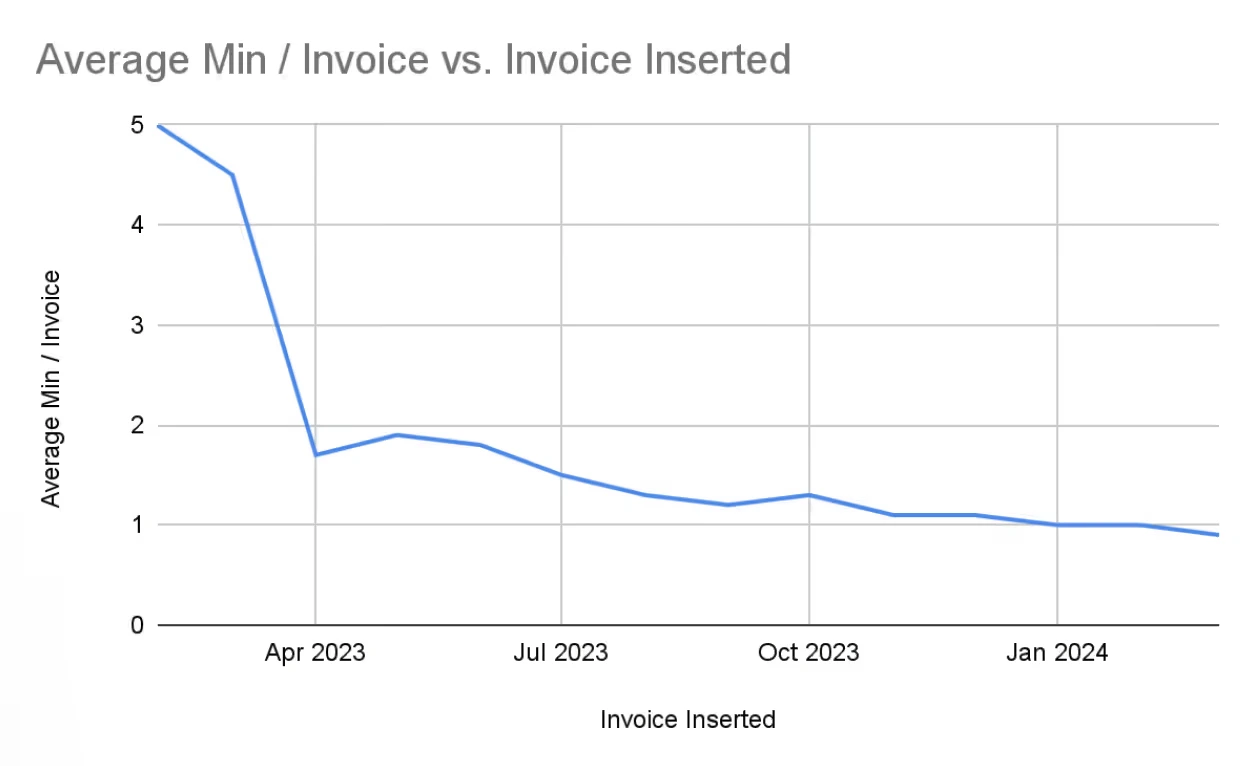
- Before adopting Eleven, invoice processing took more than five minutes per invoice.
- Within three months, that fell to 1.7 minutes.
- After ten months, the study reports processing time below one minute.
- It also reports that 64% of client invoices needed no manual corrections to the extracted information before booking. That doesn't mean the invoices bypassed accountant review. Instead, the AI prepared information that could be confirmed without additional data entry.
“It really helps them to become reviewers instead of processors (of data entry).”
— Alain Esseiva, Alpadis Founder
Experienced accountants can devote more attention to the records being prepared when less of their day goes into typing them.
Camelot Trust
Camelot Trust’s case study focuses on the manual preparation of private-bank statements.
The team had been converting statement information into CSV files before it could be imported. This consumed time before reconciliation itself ever began.
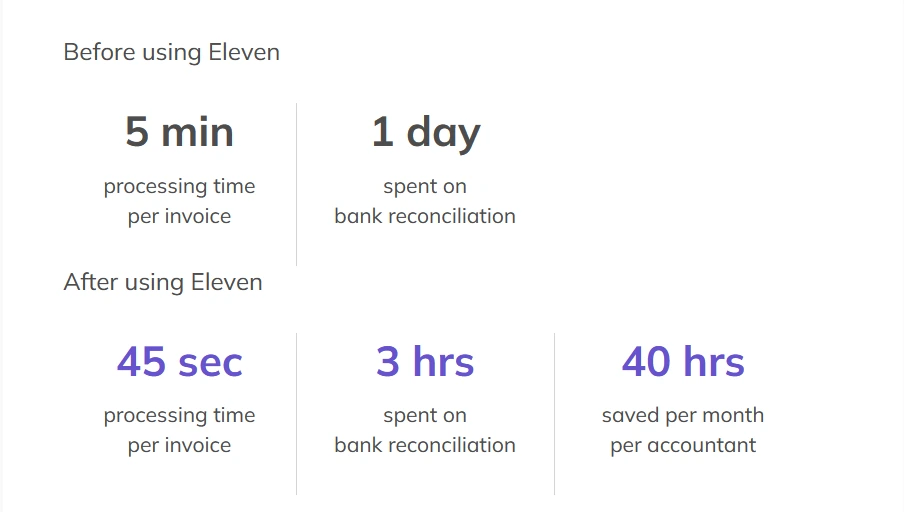
The reported results cover both preparation and accounting work.
These figures come from our published customer case studies. Your likely savings will depend on document quality, existing processes, and how much preparation is currently manual.
What Do Users Say About Eleven?
At the time of writing, Eleven held a 4.9/5 rating on Capterra from more than 120 reviews.
The reviews below reflect individual customer experiences rather than independently verified performance results.
“ My favorite feature would be the reporting section because it helps me create summaries and export the data without having to spend extra time cleaning the spreadsheets manually and The invoice management process is also very smooth. Create invoices, monitor pending payments and also monitor customer payment history all in one place. This was previously managed by our team using excel sheets and emails which resulted in confusion and duplicate records. When we moved over to Eleven, it got a lot more organized.”
— Rajiv D., Data Analyst
“My favorite part of Eleven is how easy it makes staying on top of finances. Everything’s simple, organized, and accessible anytime, so I spend less time stressing and more time running my business."
— James S., Senior Sales Executive
“Most of our team works remotely. We had hard time using desktop systems. With Eleven, Our team can collaborate remotely, I can be able to monitor our accounting data, generate, send/share reports digitally. Our partners and stakeholders are happy to get electronic statements and not paper work.”
— Dennis S., Founder and CFO
There are limitations worth noting, too. Rajiv wanted greater flexibility in report customization and described occasional slowness when working with older records or large datasets. He also found that initial setup required more assistance than expected.
Eleven's workflow and reporting capabilities are worth testing with your own records, especially if your practice manages large volumes of historical data.
How Much Does Eleven Cost in 2026?
Eleven charges per entity, with unlimited users on every plan. The following prices apply to an annual agreement.
The three plans differ mainly in reporting, onboarding, support, and the scope of customization.
Enterprise add-ons include cost and revenue accounting, custom roles and permissions, and advanced approval workflows.
Month-to-month plans add $10 per entity per month. The annual agreement establishes the commitment term.
Eleven’s discounts increase with the size of your entity’s portfolio and apply by entity tier.
For 20 entities, Standard costs $595 per month, or $7,140 per year, after the 15% discount.
For 30 entities, the math works out this way:
- Standard costs $892.50 per month after the 15% discount.
- Professional costs $1,020, a difference of $127.50 per month or $1,530 per year.
Professional adds a custom report builder, priority support, and included implementation and migration. The plan also lists consolidated reporting, which Eleven's founder describes as an API-based workflow that lets accountants access financial data across companies and prepare consolidated reports in their preferred reporting tools.
If those reports are part of your normal service, Professional is worth considering from the outset.
If Standard covers the work, compare its first-year total after adding the quoted onboarding charges.
How Does Eleven Compare With QuickBooks and Xero?
Accounting software costs can add up quickly when a firm manages dozens of separate businesses. Eleven's per-entity pricing and volume discounts provide a different cost structure worth comparing with Xero and QuickBooks.
The following example assumes 30 entities, with a separate subscription for each entity where required. It uses current US list prices for Xero and QuickBooks and Eleven's annual-agreement pricing, including its 15% volume discount.
At these rates, Eleven Professional's annual base subscription cost is $22,680 lower than 30 Xero Established subscriptions.
However, these aren't identical products or contractual arrangements.
Eleven's prices require an annual agreement, while the competitor figures use monthly list prices. The plans also differ in functionality, user limits, integrations, and reporting capabilities.
- For instance, Xero Growing doesn’t include multicurrency accounting, while Established does.
- Eleven includes multicurrency accounting from Standard. For group reporting, its API provides access to financial data from multiple companies, allowing accountants to perform consolidation work in external reporting tools such as Excel or Power BI.
The figures exclude taxes, promotions, eligible accounting-firm discounts, additional integrations, payroll, and separately charged implementation costs. They also assume each entity maintains its subscription throughout the year.
Use the table as a starting point for budgeting, then compare actual quotes and the complete workflows your practice needs to support.
How Can You Move Your Books to Eleven?
Moving accounting systems is easier to manage when you start with a familiar entity and establish a clear migration plan before transferring your records.
Here's how to approach the process:
1. Choose a representative entity
Start with a client or company that reflects your normal accounting work, including currencies, bank transactions, outstanding balances, and reporting requirements.
2. Agree on a migration cutoff date
Decide when you'll stop recording new transactions in the old system and begin using Eleven. Document how transactions around the transition date will be handled to avoid missing or duplicating entries.
3. Map your chart of accounts
Review account codes, tax settings, currencies, and accounting classifications before importing records. This is also an opportunity to clean up unused or inconsistent accounts.
4. Reconcile your opening balances
Confirm that the opening trial balance in Eleven agrees with the closing trial balance from the previous system. Investigate discrepancies before proceeding.
5. Check outstanding receivables and payables
Make sure unpaid customer invoices, supplier bills, and other open balances transfer correctly. These records will affect collections, payments, and future reconciliations.
6. Preserve your historical records
Agree which transactions and supporting documents will move into Eleven and which will remain in a secure, accessible archive. Confirm that your team can still retrieve the old records when needed for audits, tax filings, or client inquiries.
7. Test a complete accounting cycle
Process invoices, review bank transactions, reconcile accounts, and generate your regular financial reports. Check that users have the appropriate access and that the resulting figures agree with your expectations.
Eleven's support library includes guidance on imports, opening balances, bank statements, and converting QuickBooks Online data.
Implementation, migration, and training are included with Professional and Enterprise. Standard includes training, with implementation and migration charged separately.
Bring Your Multi-Entity Accounting Together With Eleven
Eleven is best for accounting firms and family offices managing multiple entities. It helps simplify the work that goes into maintaining accurate books by putting your ledgers, documents, bank transactions, and reporting into one platform.
Its AI tools take on repetitive data preparation, while accountants retain control over reviewing and approving entries. And with multicurrency accounting, unlimited users, and volume-based pricing, it’s built to support growing entity portfolios.
Of course, the best way to know whether Eleven fits your practice is to see how it handles your actual workload. Our team can walk you through the platform, discuss your reporting requirements, and help you plan a migration that makes sense for your existing accounting processes.
Explore Eleven With a Free Test Drive →
Frequently Asked Questions (FAQs)
How Much Does Eleven Cost per Month?
Eleven Standard starts at $35 per entity per month on an annual agreement. Professional starts at $40, and Enterprise uses custom pricing.
Volume discounts begin at 10 entities, while month-to-month plans add $10 per entity per month.
Does Eleven Include Unlimited Users?
Yes. Eleven includes unlimited users on every plan. Subscription pricing is based on entities, so adding colleagues doesn’t add a separate user license charge under that model.
Can Eleven Manage Multiple Companies?
Yes. Eleven supports multi-entity bookkeeping from Standard, allowing accounting firms and family offices to maintain separate company ledgers within one platform.
For consolidated reporting, Eleven's API allows users to access financial data from multiple companies and bring it into tools such as Excel, Power BI, or Tableau.
Accountants can then prepare consolidated financial statements in their preferred reporting environment, including any necessary intercompany adjustments and currency translation.
Does Eleven Support Multi-Currency Accounting?
Yes. Standard includes support for more than 170 currencies and FX revaluation. Teams with complex group translation requirements should demonstrate those separately from entity-level foreign-currency accounting.
Can Eleven Extract Private-Bank Statements?
Eleven provides bank statement extraction alongside bank feeds. Extraction is useful when banking information arrives in PDFs or images.
Check direct-feed availability against your institutions and account types.
Does Eleven Require Approval Before Posting AI-Prepared Invoices?
Eleven’s documented workflow places extracted invoices and their associated draft entries before the accountant for confirmation.
Bank reconciliation also proposes matches for review, while FX revaluation produces draft entries for approval.
Is Migration to Eleven Included?
Implementation, migration, and training are included on Professional and Enterprise. Standard includes training, while implementation and migration are chargeable.
Confirm what information the migration covers before comparing first-year costs.
Was this article helpful?
Thank you! Your feedback has been received!
Oops! Something went wrong while submitting the form.