Full Xero Review With Updated US Pricing and Features (2026)
Home
/
Blog
/
Sage Intacct Review (2026): An Accountant’s Verdict
Sage Intacct Review (2026): An Accountant’s Verdict
Written by
Reviewed by
In this Sage review, we analyze Sage’s product lineup, Sage Intacct’s features, and real customer reviews to decide whether Sage is the right accounting solution for you.
.avif)
As companies scale, choosing the right accounting system becomes more complex. This review clarifies how Sage compares, where it excels, and it may fall short.
Sage has been around for over 40 years and today serves millions of businesses across dozens of countries.
However, its fragmented product lineup can be confusing to navigate, and the flagship product (Sage Intacct) is powerful in the right hands but mismatched if you pick the wrong version for your situation.
This Sage accounting software review focuses specifically on what this offering actually does well, where actual users run into problems, what it costs, and who it's actually built for.
Short Answer: Is Sage Intacct a Good Fit for Accounting Firms?
Sage Intacct is a cloud-native financial management platform built for mid-market organizations managing multi-entity, multi-currency, and compliance-heavy operations.
It handles consolidated reporting, dimensional accounting, and automated AP/AR competently.
The honest catch is that it’s designed for the internal finance team of a complex organization, not for accounting firms managing external clients. Understand that distinction before you book a demo.
Which Sage Accounting Product Are You Actually Evaluating?
This matters more than most reviews acknowledge. Sage is not a single product. Buying the wrong one is a mistake we’ve seen firms make, and it typically costs them a migration 12 to 18 months later.
Note: If you're a small CPA firm evaluating Sage for client use, Sage Intacct is not designed for outsourced accounting providers. It's built for the internal finance team of a complex organization. That's not a knock; it's just the architecture. More on this in the verdict section.
What Is Sage Intacct?
Sage Intacct is a cloud-native accounting platform built around a 10-dimension general ledger, native multi-entity consolidation, and a modular architecture that lets organizations add capabilities (project accounting, revenue recognition, fixed assets, subscription billing) as they grow.
It's the only cloud accounting software endorsed by the American Institute of Certified Public Accountants (AICPA), which reflects its credibility as a compliance-grade financial system.
It's used heavily in nonprofits, SaaS companies, professional services firms, healthcare organizations, financial services, and industries where dimensional reporting, grant tracking, or subscription revenue recognition create needs that basic accounting software can't meet.
The 10-dimension general ledger is Sage Intacct's actual differentiator. Instead of creating hundreds of account codes to track department, project, location, and entity combinations, you tag each transaction with dimension values. The chart of accounts stays clean; reporting across any combination of dimensions is available on demand. This is the feature that consistently gets called out in reviews by finance professionals who've come from bloated QuickBooks chart-of-accounts setups.
Sage Intacct Features
Here’s what makes Sage Intacct an easy pick for many accountants across the globe.
General Ledger and Dimensional Accounting
The general ledger is where Sage Intacct earns its reputation. Ten predefined dimensions (department, employee, item, location, project, and others) tag every transaction with business context at entry.
This means you can run an income statement by geography, a profitability report by project, or a cash flow view by entity without restructuring your chart of accounts. You just filter.
The Financial Assurance AI agent adds real-time anomaly detection: it compares journal entries against historical patterns and flags outliers before they compound. This isn't just useful for audits; it catches coding errors mid-period rather than at year-end close.
Multi-Entity Consolidation
This is the reason mid-market organizations choose Sage Intacct over QuickBooks or Xero.
New entities can be set up without IT involvement, inheriting existing charts of accounts, approval rules, and process definitions.
Intercompany transactions are centralized. Due-to/due-from accounts self-balance, eliminations run automatically, and consolidated financials are available mid-month without waiting for period-end close.
Sage Intacct publishes a customer benchmark worth noting:
- 📊 MidCap Credit and Capital saved 16 hours per month on global consolidations after implementation, with software payback in under seven months.
- 📊 Atlanta Convention & Visitors Bureau shortened monthly close from 10 days to under 3.
Note: Users with large numbers of intercompany entity setups report that the configuration becomes unwieldy at scale. One assistant financial controller with a global team noted that intercompany setup “doesn't work effectively” once entity count gets high. Factor this into your evaluation if you're managing dozens of subsidiaries with complex intercompany flows.
Accounts Payable and AI Automation
The AP Automation agent handles the full AP cycle: upload or email an invoice, and Sage AI extracts vendor, amount, dates, and line items, creates a pre-populated draft, matches against purchase orders, and routes for approval.
Duplicate detection runs automatically. The more you use it, the better the coding accuracy gets.
Note: One minor UX issue lagged in reviews: after submitting an AP draft invoice, the system returns you to the full list rather than advancing to the next draft. It's not a functional gap but it slows high-volume AP processors. This is worth flagging in your demo.
Accounts Receivable
AR automation covers recurring invoice generation, automated payment reminders, customer aging reports, and deferred revenue tracking.
Order transactions post automatically to the GL and AR ledger. CRM integration with Salesforce means sales order data flows directly into billing without re-entry.
Collections is handled through structured, automated processes: configurable reminders, case assignment for overdue accounts, and centralized activity logging.
The AR dashboard gives real-time visibility into customer aging, outstanding invoices, and cash flow position.
Reporting and Dashboards
150+ built-in financial reports, a custom report writer, role-based dashboards, and mid-month roll-up reporting without waiting for period-end close.
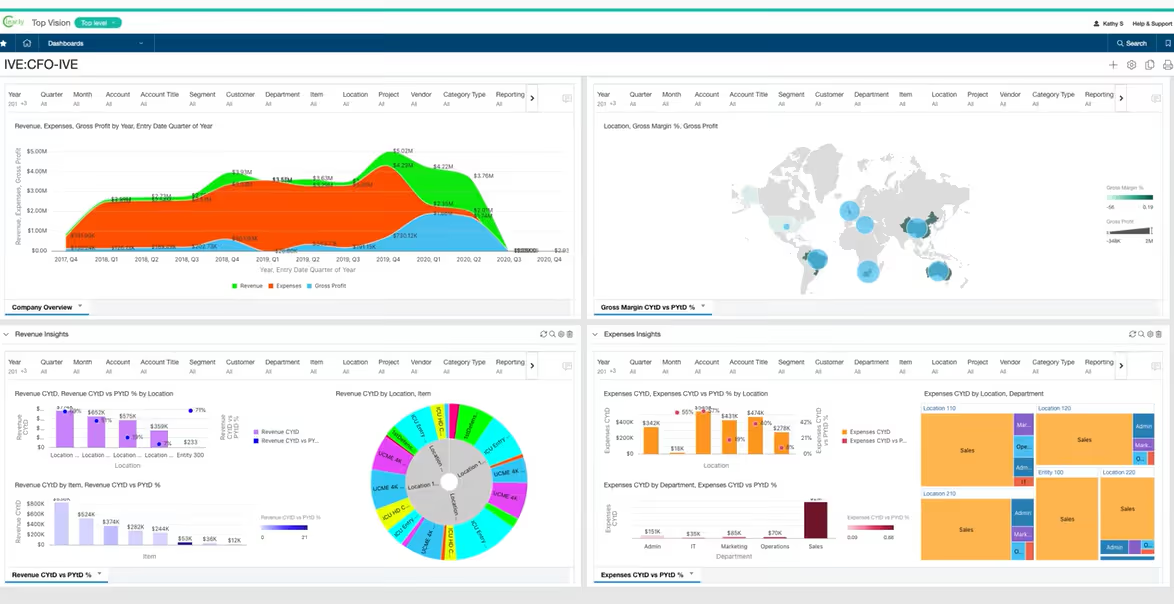
The drill-down from any summary figure to source transactions is one click.
For multi-entity organizations, this means a CFO can see consolidated financials in the morning and drill into a specific entity's expense variance before lunch.
Pro Tip: The report writer is powerful but has a learning curve. G2 reviewers consistently flag that advanced custom reports (anything beyond standard templates) require time investment or implementation partner support to build well. Budget for this during onboarding, not after go-live.
Cash Management and Bank Reconciliation
Sage Intacct connects to financial institutions globally, imports transactions automatically, and reconciles bank accounts with auto-matched and auto-created draft transactions.
📊 The Association of College Unions International shortened bank reconciliations from 5 hours to 5 minutes after implementation.
Earlier versions of Sage Intacct had limitations with automated bank reconciliation, which showed up in older reviews.
The current platform handles automated reconciliation natively; the issues some users experienced was typically a configuration issue during implementation, not a feature gap.
That said, complexity of bank feed setup varies by institution and region.
Planning and Budgeting
The planning module supports budgets, forecasts, and what-if scenario modeling with spreadsheet-like formulas and collaborative functionality across departments.
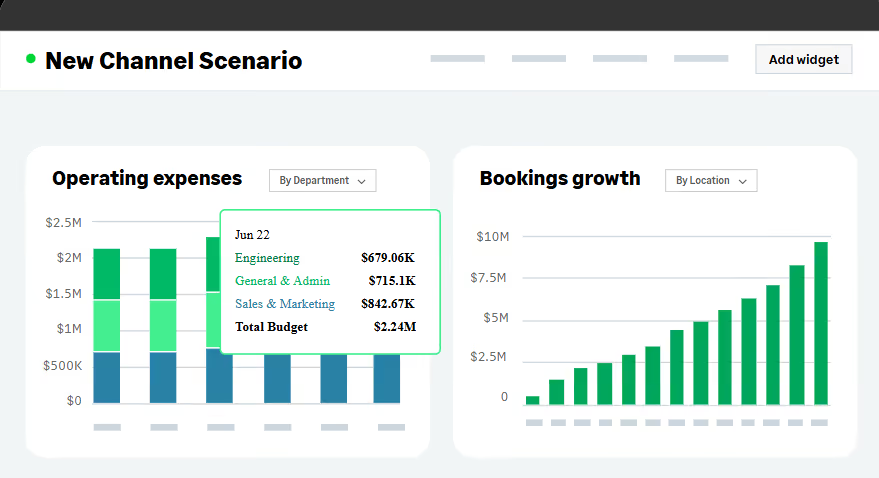
Real-time data feeds into planning so scenarios reflect current actuals rather than last month's numbers. For mid-market FP&A teams that have been running planning in Excel, this is a meaningful upgrade.
Global Capabilities and Multi-Currency
Multi-currency transactions, automated FX rate tables, and currency conversions are supported across entities, as well as intercompany transactions with automatic currency translation and IFRS and GAAP-compliant reporting.
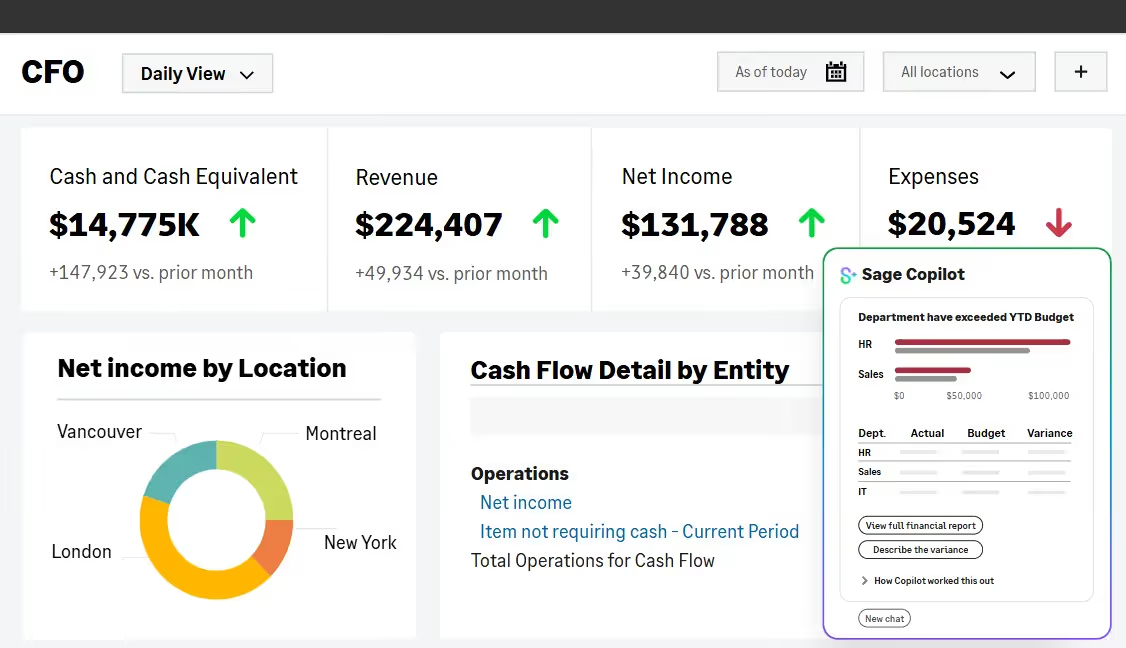
For organizations with international subsidiaries each filing under different local standards, the multi-book capability (maintaining parallel sets of books from a single transaction source) is a great feature.
If multi-currency consolidation is the primary driver for your evaluation, our multi-currency accounting software comparison covers Sage Intacct alongside NetSuite, Eleven, Xero, and QuickBooks in depth.
Industry-Specific Modules
Sage Intacct has purpose-built depth in several verticals that generic accounting platforms can't match:
- Nonprofits: grant tracking and billing, ASU 2018-08 and ASC 606 compliance, fund accounting, donor management via DonorPerfect integration.
- SaaS and subscription businesses: contract and subscription billing, revenue recognition under ASC 606/IFRS 15, SaaS metrics dashboards.
- Construction and real estate: job cost accounting, AIA billing, project profitability, lease accounting compliance.
- Healthcare: EMR integration, clinical metrics reporting, HIPAA compliance.
- Professional services: project accounting, timesheet management, resource planning, client billing.
Sage Intacct User Reviews
Sage Intacct holds 4.3/5 stars across 4,250+ reviews on G2. Most reviewers are finance professionals describing specific workflows, not casual users giving one-line opinions.
“It feels like an incredibly powerful finance engine wrapped inside workflows that still require too many clicks, workarounds, and consulting hours. Many advanced workflows require additional modules, partner support, or paid consulting. Costs can snowball faster than expected."
— Muhammad O., Accounting Manager, Enterprise (G2)
That review from a senior accounting manager captures the primary issues in Sage Intacct:
- The capability ceiling is genuinely high, but the path to that ceiling costs more and takes longer than the base price suggests.
- The 4-month average implementation time on G2 and 18-month average ROI payback period are the honest numbers to plan around.
Sage Intacct Pricing
Sage Intacct doesn't publish pricing. Every deployment is custom-quoted based on entity count, user count, modules required, and industry.
The figures below are market estimates based on publicly available data and should be treated as planning ranges, not quotes
Note: The modular pricing structure is where costs compound. Multi-entity consolidation is core, but fixed assets, project accounting, subscription billing, and advanced reporting are purchased separately. Get a full module list for your use case before comparing against the base quote. Several G2 reviewers explicitly note that “every new module is released as an add-on so existing users don't see any of the benefit,” meaning capabilities you'd expect to be standard in a platform at this price point may require additional line items.
Who Sage Intacct Is Right For
Sage Intacct is a strong fit when most of these apply:
- You're a mid-market organization (roughly 50 to 500 employees) with financial complexities that include multiple entities, subsidiaries in different jurisdictions, or compliance requirements that basic accounting software can't handle.
- You operate in a vertical Sage Intacct has purpose-built modules for, such as a nonprofit, SaaS, professional services, healthcare, construction, or financial services.
- You need multi-book accounting, i.e., maintaining parallel sets of books under different accounting standards from a single transaction source.
- You have budget for a 4+ month implementation, ongoing module costs, and ideally a certified implementation partner.
- Your primary use case is managing your own organization's finances, not managing books on behalf of external clients.
Who Sage Intacct Is Not For
The clearest mismatch is for CPA firms and accounting practices managing books for external clients.
Sage Intacct doesn't have a multi-client management architecture; it's built for a single organization managing its own complex structure, not an outsourced provider managing 50 different client entities under one platform.
A few other scenarios where Sage Intacct tends to underperform:
- Small organizations under 20 to 30 employees, as the implementation weight and ongoing cost rarely justify the capability.
- Businesses that need simple, fast setup, as the average implementation is 4 months and requires significant internal resource commitment.
- Teams without a dedicated finance person who can manage the platform; the learning curve is steep and the permission system can become cumbersome without someone owning it.
Sage Intacct vs. Alternatives
Here’s how Sage Intacct compares to its other popular platforms.
For a deeper comparison of how Sage Intacct handles multi-entity consolidation against purpose-built alternatives, see our accounting software for CPA firms guide.
Final Verdict: Is Sage Intacct Worth It?
For the right organization, yes, emphatically. For a mid-market nonprofit managing grant compliance across currencies, a SaaS company recognizing deferred revenue under ASC 606, or a professional services firm running multi-entity project accounting, Sage Intacct is one of the best tools available at this price tier for those specific environments
- Users who invested in proper implementation and trained their teams are largely satisfied and see meaningful efficiency gains.
- Users who underestimated the implementation complexity or over-relied on the base product without budgeting for modules are the ones who leave frustrated reviews.
Where Sage Intacct falls short is for accounting firms and family offices managing multiple external clients. The platform was not designed for that operating model; it has no equivalent to a multi-client dashboard, no outsourced-provider architecture, and pricing that compounds with both user count and module count rather than scaling around client complexity.
The implementation partner you choose matters as much as the software itself. Shaun M., Head of Finance at a company migrating from Sage 50, put it plainly in his review: "The support and onboarding has been tough but really good — we have had a lot of support from our implementation partner (Baker Tilly), which has been massively valuable." If you're evaluating Sage Intacct, spend as much time evaluating your VAR as you spend evaluating the platform.
Related Reading
If you're evaluating accounting platforms for a professional practice or family office, these guides cover adjacent decisions:
- Accounting Software for CPA Firms: How purpose-built multi-client platforms compare to internal-use systems like Sage Intacct.
- Family Office Accounting Software: Features, tools, and architecture for family office environments.
- Best Multicurrency Accounting Software: Sage Intacct vs. NetSuite, Eleven, Xero, and QuickBooks on FX depth and IAS 21 compliance.
- Types of Accounting Systems: Flat ledgers vs. dimensional systems vs. multi-entity platforms: the architectural differences that matter.
- Accounting System Migration: What to plan for when moving from one platform to another, including from Sage.
- Best Cloud Accounting Software: Broader comparison of cloud accounting platforms by firm type and complexity
Frequently Asked Questions (FAQs)
Is Sage Intacct good for small businesses?
Generally no. Sage Intacct is built for mid-market organizations with genuine financial complexity, such as multiple entities, compliance requirements, or industry-specific needs.
The implementation timeline (4+ months on average), cost structure ($12,000 to $15,000+ per year before modules), and feature depth are all calibrated for organizations that have outgrown small-business tools.
For small businesses, Sage 50 or Xero are more appropriate.
How much does Sage Intacct cost?
Sage Intacct doesn't publish pricing. Based on market data, core financials typically run $12,000 to $15,000/year for a basic configuration, rising to $25,000 to $75,000+ for mid-market deployments with multiple modules and higher user counts.
Implementation fees of $5,000 to $20,000+ apply separately and are one-time. Every deployment is custom-quoted, so contact Sage or a certified VAR for accurate pricing.
What is the difference between Sage 50 and Sage Intacct?
Sage 50 is a desktop-based accounting tool for small businesses. It covers invoicing, basic bookkeeping, job costing, and simple inventory.
Sage Intacct is a cloud-native platform for mid-market organizations with multi-entity consolidation, dimensional reporting, revenue recognition, and advanced compliance tooling.
They share a brand name but are fundamentally different products at different price points and complexity levels.
Is Sage Intacct good for accounting firms?
Not in the outsourced accounting provider sense. Sage Intacct is designed for internal finance teams managing their own organization's books. It doesn't have a multi-client management architecture, client-facing workflows, or pricing that scales around managing dozens of external entities.
CPA firms and family offices managing multiple clients are better served by platforms built for that model.
How long does Sage Intacct implementation take?
G2's average based on real user data is 4 months. This reflects a full implementation including data migration, configuration, user training, and go-live. Simpler deployments with fewer entities and modules can run faster; complex multi-entity, multi-module implementations take longer.
Implementation partner quality is a significant variable; most experienced Sage Intacct users recommend using a certified VAR rather than implementing directly.
Does Sage Intacct support multi-currency accounting?
Yes. Sage Intacct handles multi-currency transactions, automated FX rate management via OANDA, IFRS and GAAP-compliant revaluations, and multi-entity consolidation across different functional currencies.
For a detailed comparison of how it handles this versus other platforms, see our multicurrency accounting software guide.
Was this article helpful?
Thank you! Your feedback has been received!
Oops! Something went wrong while submitting the form.