

Family Office Accounting Checklist for Month-End and Year-End
Home
/
Blog
/
8 Best Bank Reconciliation Software in 2026 Compared by Use Case
8 Best Bank Reconciliation Software in 2026 Compared by Use Case
Written by
Reviewed by
We compare 8 bank reconciliation tools, including Eleven, QuickBooks, Xero, and NetSuite, on matching, controls, and price, so you can pick the right fit.
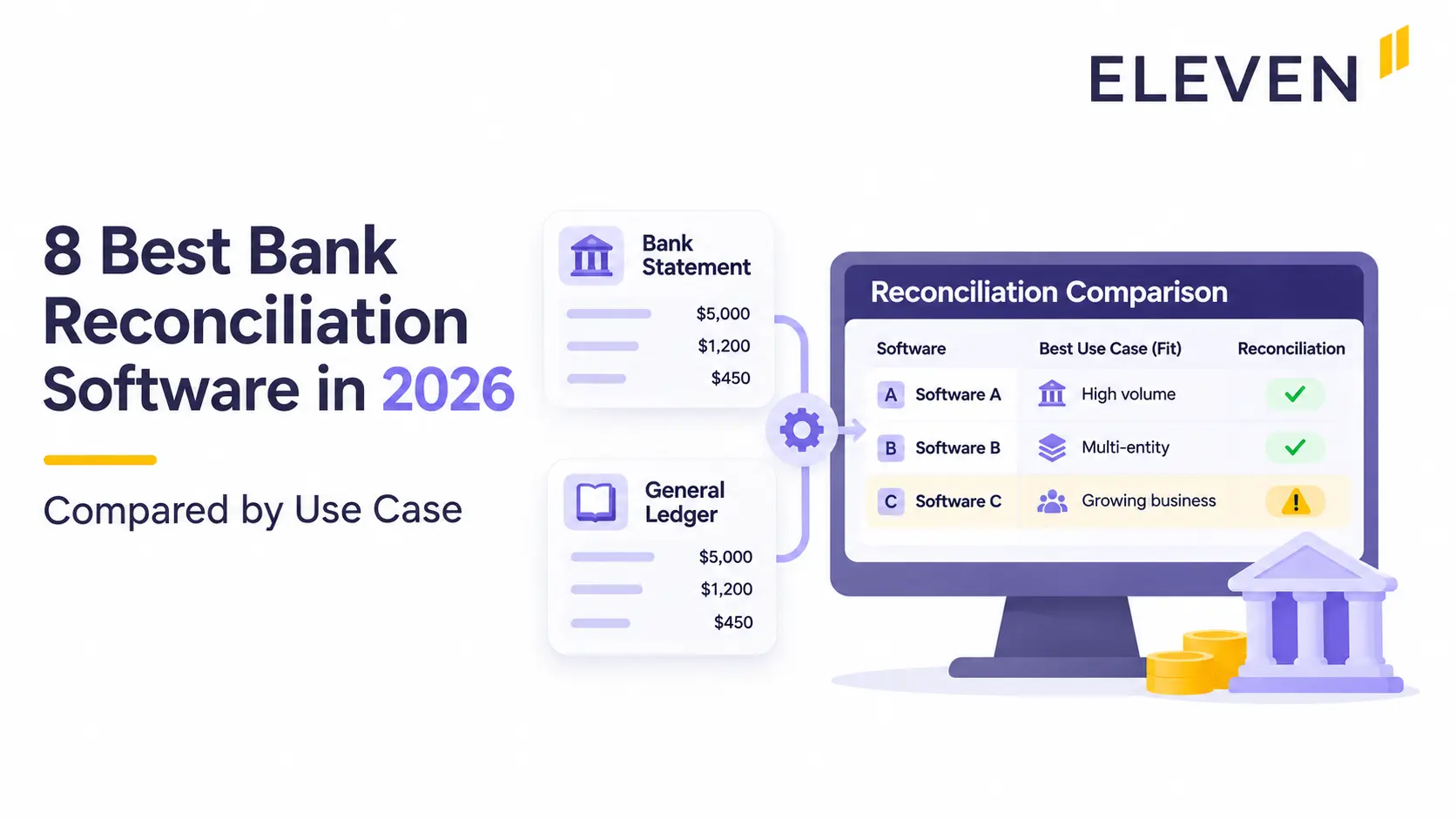
The right bank reconciliation software depends on whether you want a new ledger or a tool that works with your current one. This comparison covers eight options across accounting software, ERPs, and specialist platforms, with pricing, pros and cons, real user reviews, and a 25-client cost comparison for accounting firms.
The best bank reconciliation software for you depends on one question: do you want a new accounting platform, or a tool that works with the one you already have?
QuickBooks Online, Xero, Zoho Books, and Eleven reconcile bank accounts inside their own ledgers. Sage Intacct and NetSuite do it inside a larger financial system. HighRadius and Numeric sit on top of an existing ERP and take over the heavy matching work.
We compared all eight on matching, statement checks, controls, and price, and set out who each one suits.
What's the Best Bank Reconciliation Software?
For accounting firms reconciling many client ledgers, Eleven is the strongest fit: each client entity keeps its own ledger in one platform, and Eleven suggests a match for every bank line for your team to confirm.
For small businesses, QuickBooks Online, Xero, and Zoho Books handle reconciliation well inside everyday bookkeeping. Sage Intacct and NetSuite suit larger finance teams, and HighRadius and Numeric suit companies that want to keep their ERP:
Regular US prices before promotions and tax. Eleven's price assumes an annual agreement, and Zoho's $15 rate requires annual billing. Some reconciliation features need higher plans or extra modules.
Do You Need Accounting Software or a Dedicated Reconciliation Tool?
It depends on whether you're happy with your current ledger. Bank reconciliation software comes in three types:
This matters for price. A specialist platform is usually another subscription on top of your ERP, while accounting software includes the ledger itself.
Keep in mind that matching every transaction isn't the same as completing a reconciliation. Software can match hundreds of lines and still leave you to prove the statement balance and explain the outstanding items.
Which Bank Reconciliation Software Should You Consider?
These are the eight, starting with the tools that include their own ledger.
1. Eleven for Accounting Firms With Many Client Ledgers
Eleven is cloud accounting software built for firms and family offices that keep separate books for many clients or entities.
Every entity has its own ledger, but they all sit under one login, so your team reconciles client after client without switching between separate subscriptions.
Bank data comes in through connected feeds, a CSV template, or PDF statements, which Eleven's AI reads so you can check the extracted lines before importing them.
During reconciliation, Eleven suggests matches based on amount, date, payee, and past transactions, and an accountant confirms each one or creates the missing deposit or withdrawal. The reconciliation guide and import guide show the workflow.
Pros
- Separate ledgers for every client under one login
- AI extraction for PDF bank statements
- Unlimited users on every plan
- 170+ currencies on every plan
Cons
- Every match needs an accountant's confirmation, so nothing reconciles on its own
- No built-in payroll or inventory
Capterra Reviews: 4.9/5 (122 reviews)
Customers on Capterra give the highest ratings to Eleven’s ease of use, pricing, and customer support. Here’s what one data analyst said:
“The best thing about Eleven is the ease of use compared to many other invoicing systems. The interface is straightforward and clean so new employees can learn it easily with minimal training.”
— Rajiv D., Data Analyst, Capterra, May 2026
Eleven is best for accounting firms and family offices that reconcile many separate entities every month and want accountants to stay in control of every match.
Eleven Pricing
Eleven charges per entity, and the rate drops as you add entities:
Annual agreement. Volume discounts start at 10 entities (10% off) and reach 30% at 200+.
2. QuickBooks Online for US Small Businesses
QuickBooks Online reconciles bank accounts inside a familiar small-business ledger that also handles invoicing, expenses, and reporting.
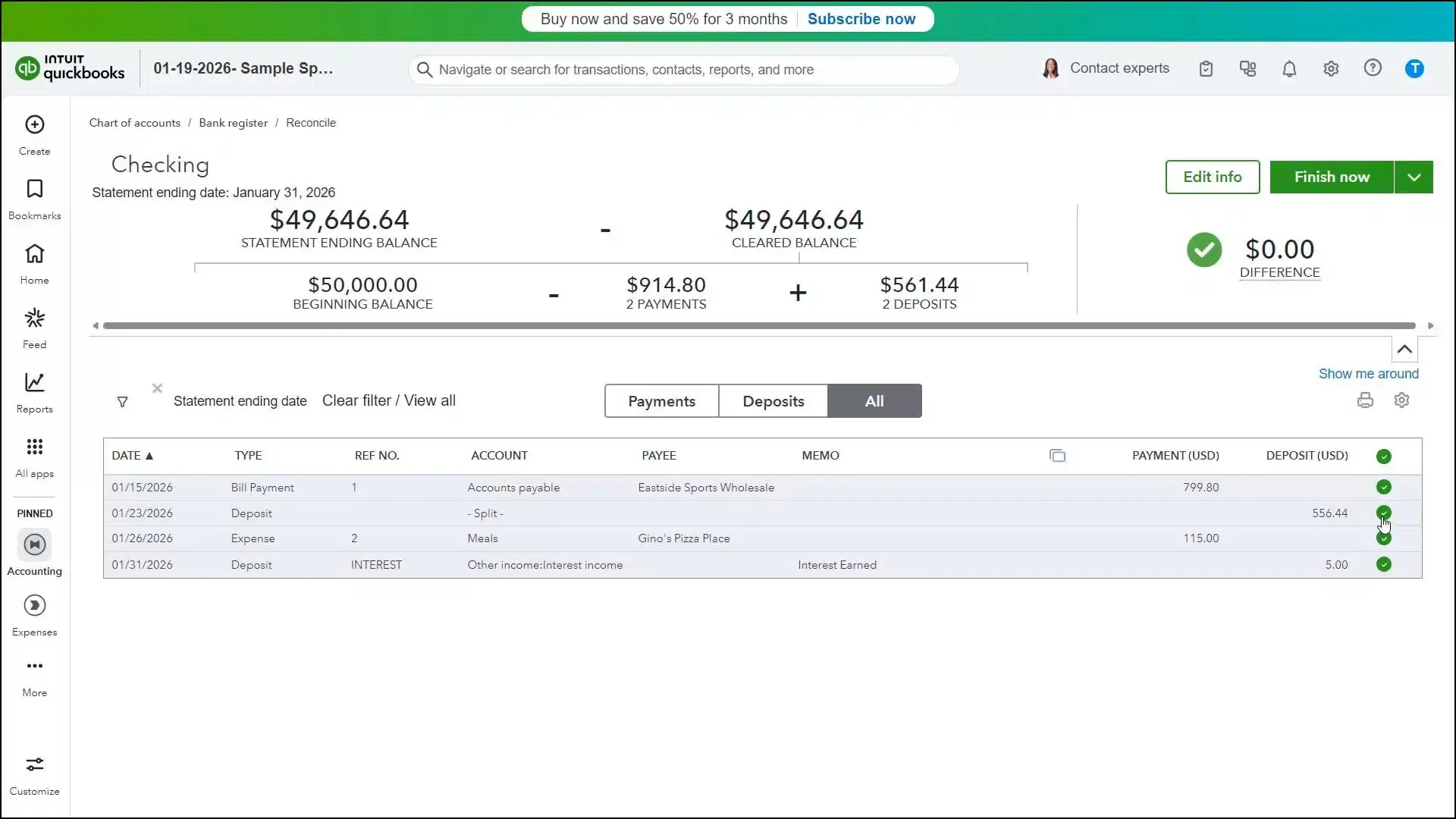
Matching and reconciling are separate steps: bank feeds suggest matches and apply your rules, then the Reconcile workflow asks for the statement's ending date and balance so you can find and clear the difference.
When you finish, QuickBooks produces a reconciliation report of cleared and uncleared items, which you can view or print.
Intuit's help notes that you can't export it straight to Excel. Accounting AI is on Essentials and up, and AI reconciliation help is on Plus, Advanced, and Intuit Enterprise Suite.
Pros
- Statement-level reconciliation with a built-in report
- Bank rules can add recurring transactions automatically
- Accountants get separate access, plus a 30% ProAdvisor discount
Cons
- Reconciliation reports can't be exported to Excel
- AI reconciliation help starts on Plus ($140/month)
- Each client company needs its own subscription
G2 Reviews: 4/5 (3,912 reviews)
Users on G2 like QuickBooks’ user-friendliness, integrations, and intuitive interface, though some feel that the platform is missing important features and its costs accumulate at scale.
Here’s what one user said:
“Bank reconciliations, transaction tracking, and financial reporting are easier to manage in one place.” … “Occasional syncing issues with bank transactions and limited flexibility in certain reports can also be frustrating.”
— Heena G., Supervisor, Mid-Market, G2, October 2026
QuickBooks Online is best for small businesses that want reconciliation inside the books they already use. Our QuickBooks review covers the rest of the platform.
QuickBooks Online Pricing
QuickBooks has four US plans:
External accountants don't count toward those user limits, so adding staff at your firm doesn't force client upgrades.
3. Xero for Automatic Matching
Xero goes further than most small-business tools in letting the software reconcile on its own. Once you switch it on for an account, its JAX feature reconciles high-confidence bank lines automatically using your rules, past matches, and predictions, and leaves uncertain lines for you to review.
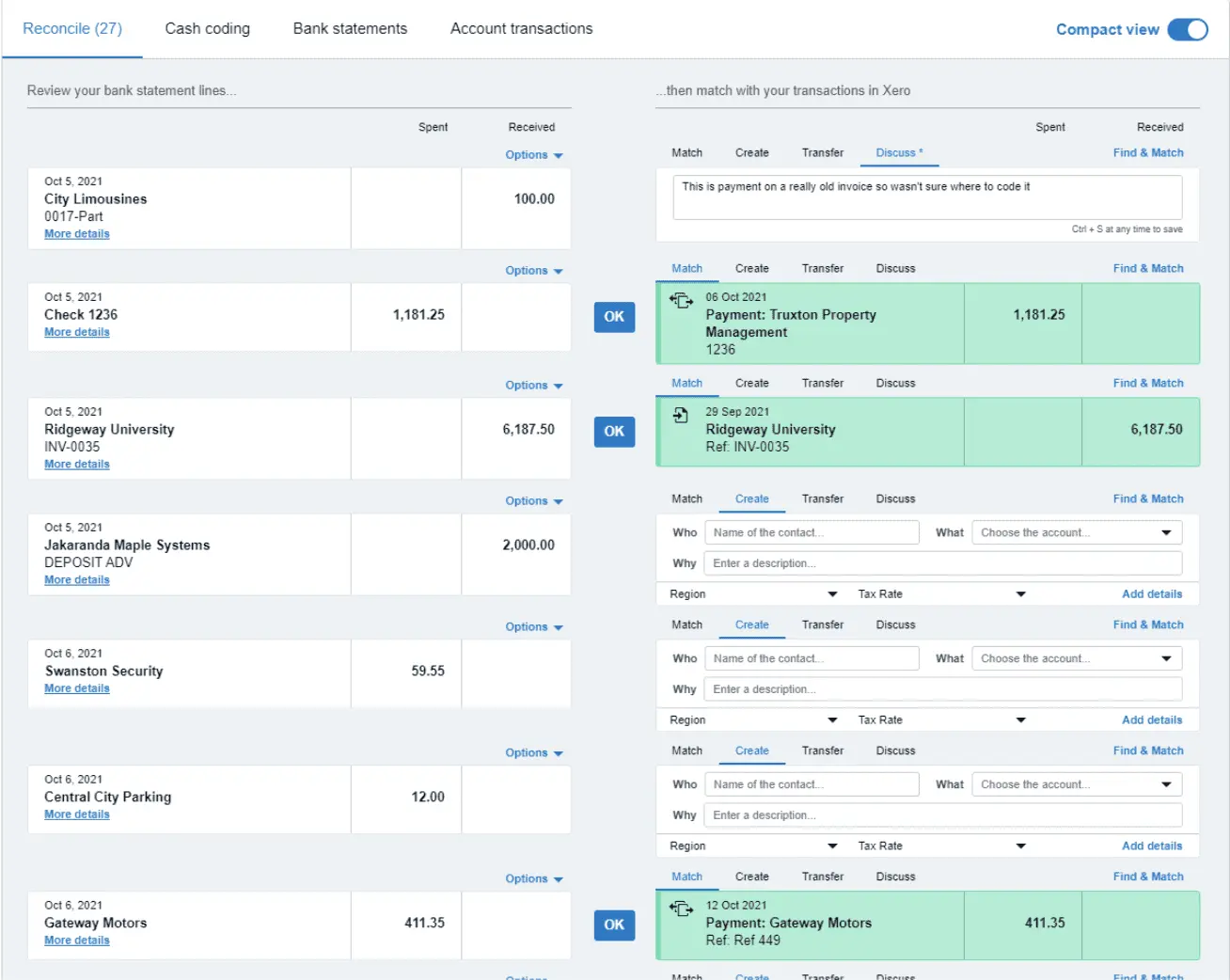
That's a huge difference from tools that wait for a person to confirm every match. Xero still keeps period-level checking separate, through its Reconcile Period workflow, so automatic matching doesn't replace confirming the statement balance.
Pros
- Optional automatic reconciliation of high-confidence lines
- Unlimited users on every plan
- Auto-reconciliation on or off per bank account
Cons
- Early caps you at 20 invoices and 5 bills a month
- Multi-currency only on Established ($97)
- One subscription per organization
G2 Reviews: 4.4/5 (1,861 reviews)
Xero maintains positive reviews for its ease of use and invoice management features, though users should note that it lacks group company management and is limited in terms of customization.
“The interface is simple to navigate, and features like automatic bank reconciliation, invoicing and expense tracking save a lot of time.”
— Solomon A., Digital Marketing Manager, G2, August 2026
Xero is best for small businesses that spend too long on routine matching and are comfortable letting software reconcile the obvious lines. Our Xero review covers its pricing in more depth.
Xero Pricing
Xero's US plans all include unlimited users:
4. Zoho Books for Low-Cost Reconciliation With Flexible Rules
Zoho Books packs a capable reconciliation workflow into low prices. Beyond bank feeds and rules, it supports partial and grouped matching, so a payment processor's single deposit of several customer payments, minus fees, can be matched to the payments behind it rather than logged as one unexplained receipt.
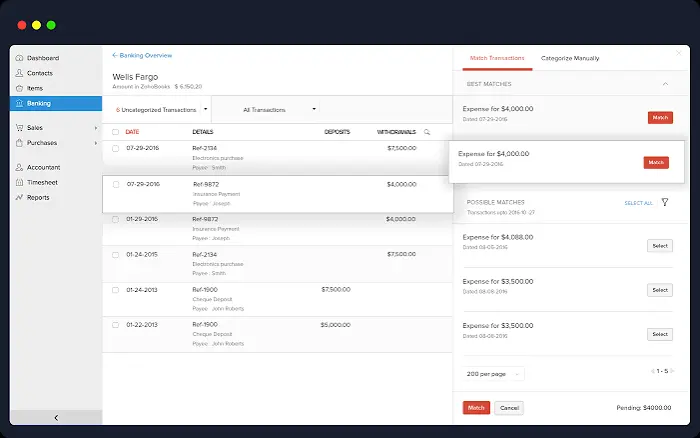
A separate reconciliation step asks for the account, the period, and the statement's closing balance. Zoho's 2026 banking update added AI field prediction, centralized rules, and PDF statement imports for selected banks in the US, Canada, and Mexico, so check that your bank is on the list.
Pros
- Free plan with manual reconciliation
- Partial and grouped matching
- Lowest paid entry price on this list
Cons
- PDF imports only work with selected banks
- Bank feeds start on Standard
- Three users on Standard; extra users cost more
G2 Reviews: 4.4/5 (333 reviews)
On G2, users praise the platform’s user-friendliness and automation features, though many users raise concerns about its customer support team.
“I appreciate how Zoho Books brings invoicing, expense tracking, bank reconciliation, and financial reporting together in one place.” … “The bank reconciliation process can occasionally require additional manual review…”
— Sudeep B., Senior Accountant, Capterra, October 2026
Zoho Books is best for budget-conscious small businesses that want bank rules and a proper period reconciliation without paying for a bigger system. You can learn more about the platform in our Zoho Books review.
Zoho Books Pricing
Zoho's main plans, billed monthly or annually:
The Free plan covers businesses with up to $50,000 in annual revenue. Professional adds multi-currency.
5. Sage Intacct for Mid-Market Cash Management
Sage Intacct handles bank reconciliation through its Cash Management module, inside a wider financial system built for finance teams. You can import bank data or use configured feeds, set matching rules for recurring activity, and set rules that create entries when bank lines need them.
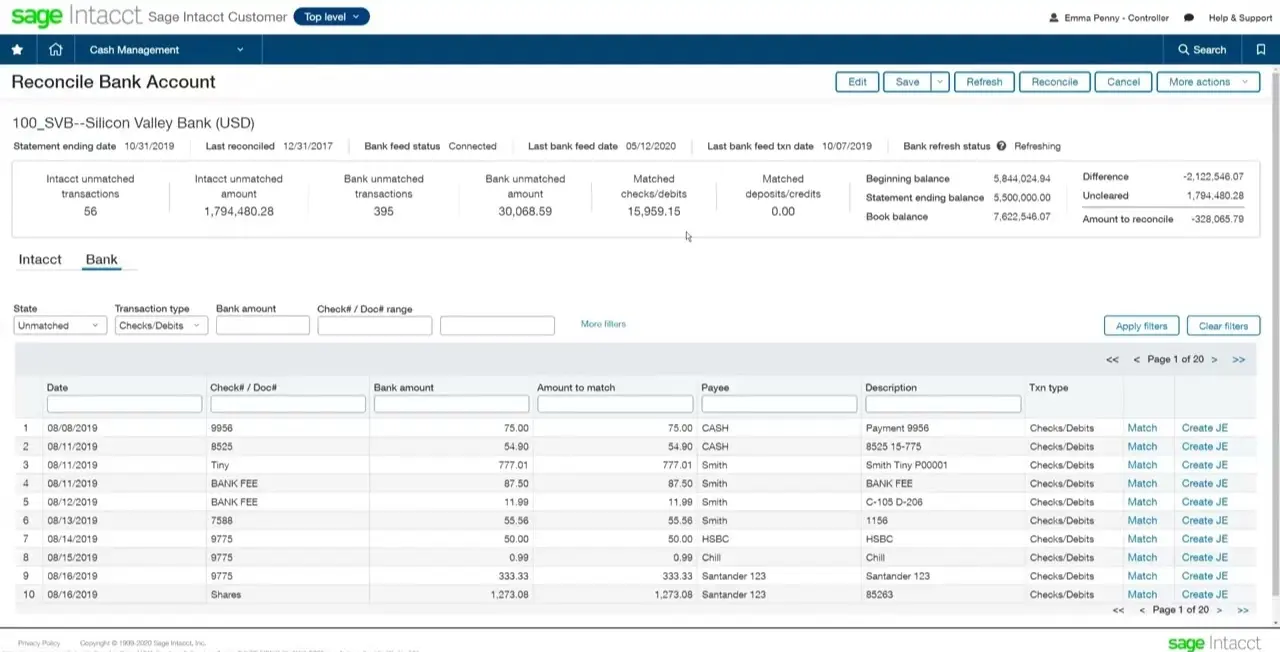
Its reporting and controls are where it stands out. Sage documents both a Reconciliation report and an Outstanding Items report, and permissions control who can reopen a reconciled period, which matters when several people work on the books.
Pros
- Rules that match and create entries
- Reconciliation and Outstanding Items reports
- Permission-controlled reopening of reconciled periods
Cons
- Custom quote and a separate implementation project
- Bank feeds depend on supported services
- Too much system for a few simple bank accounts
G2 Reviews: 4.3/5 (4,571 reviews)
Sage Intacct is most praised for its customization features, easy Excel/CSV exports, and powerful reporting, though its learning curve is steeper than the alternatives.
Here’s what one user said about its bank reconciliation features:
“We appreciate how Sage automates many tasks, such as bank and account reconciliations. Recurring journal entries are a breeze, as is integration with other applications like Paylocity Payroll, which now posts to the general ledger automatically.”
— Verified User, Food Production, November 2026, G2
Sage Intacct is best for mid-market finance teams that need configurable reconciliation, reports, and controls inside a full financial system. Our Sage Intacct review covers the platform in more detail and lists partner estimates and first-year costs.
Sage Intacct Pricing
Sage doesn't publish Intacct prices; your quote depends on modules, entities, users, and implementation.
6. Oracle NetSuite for Reconciliation Inside an ERP
NetSuite splits banking into three steps: import the data, match it with Match Bank Data, then finish the statement with Reconcile Account Statement.
Matching and auto-create rules handle recurring activity, and anything that fails them stays open for investigation.
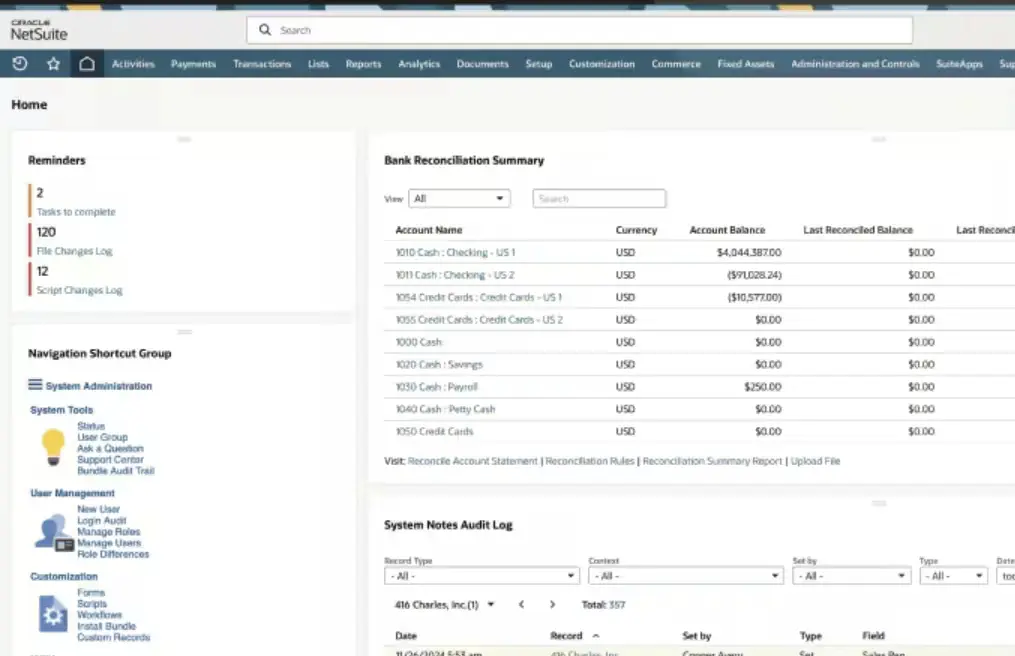
For heavier close work, Oracle sells a separate NetSuite Account Reconciliation application with preparer and reviewer controls and workpapers.
It's licensed separately, so don't assume it comes with standard banking. Bank feeds through its MX setup in the US and Canada are capped at 100 accounts and 25 credentials, and NetSuite removes some uploaded statement files after parsing them, so keep your own copies.
Pros
- Clear import, match, and reconcile workflow
- Matching and auto-create rules
- Reconciliation sits inside the full ERP
Cons
- Bank feeds have account and credential limits
- Stronger close controls need a separately licensed app
- Custom quote plus implementation
G2 Reviews: 4.1/5 (5,270 reviews)
NetSuite gets positive feedback for its customization and wide range of tools, though users often mention its higher cost and steep learning curve.
“The reconciliation process has become easier. It is much more efficient than our previous software that we had for 20+ years. The implementation process was a lot of work but the NetSuite consultants were fabulous to work with and very responsive.”
— the g., Administrator, G2, October 2026
NetSuite is best for companies already running on NetSuite or buying an ERP for broader reasons. It's hard to justify buying an ERP just to match bank lines. Our NetSuite review covers it in more detail.
NetSuite Pricing
NetSuite prices by quote, covering the platform, users, and modules, with implementation on top.
7. HighRadius for High-Volume Bank-to-Ledger Matching
HighRadius doesn't replace your ledger. Its bank reconciliation product pulls bank activity and records from your existing ERP into one matching workflow, flags differences, and helps prepare adjustments, which it can post back to the ERP once approved.
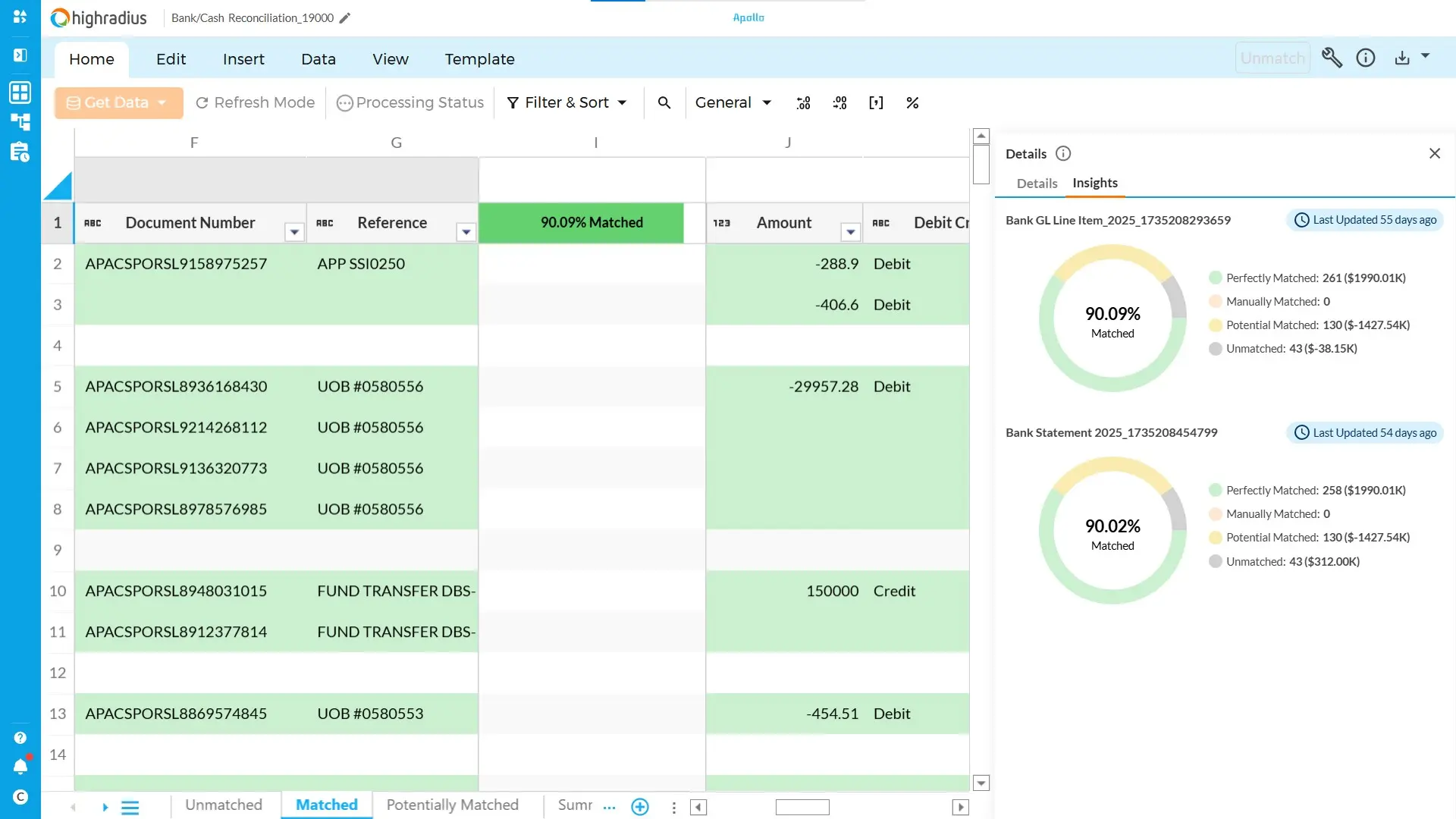
HighRadius sells several automation products, so pin down which one you're buying. Its wider Transaction Matching offering documents one-to-many and many-to-many matching, but get those methods written into the bank reconciliation quote.
And cash application, which matches customer payments to receivables, is a different job from reconciling a bank statement to the ledger.
Pros
- Built for high volumes across several banks and systems
- Exception management and approved journal posting
- Keeps your existing ERP
Cons
- Custom quote and an integration project
- Matching methods vary by module, so check the quote
- Only two G2 reviews for this product
G2 Reviews: 4/5 (2 reviews)
HighRadius's Financial Close and Reconciliation listing holds 4.0 out of 5 on G2, but from only two reviews:
Here’s what the first one liked most about HighRadius:
“Matching Rules which helps the team from a process perspective. Additionally, the software is user friendly and easy to learn.”
— Verified User, Security and Investigations, G2, June 2026
The other one, who’s in a mid-sized business, likes how it matches transactions and automates the journal entries needed to post in ERP, but disliked
“The time delays in uploading data into HR software. Not working well with Business Central ERP. The limited filtering on pages. Not being able to clear 0 zba transactions. Not having formatting for $$ on many of the tabs. Not being able to partial match to identify what is missing.”
— Verified User, Security and Investigations, G2, June 2026
HighRadius is best for large finance teams reconciling high volumes across several banks while keeping their current ERP. Test your exact ERP connection before you sign.
HighRadius Pricing
HighRadius doesn't publish a price for its bank reconciliation product. Ask for a quote that spells out modules, connectors, transaction volume, and implementation scope.
8. Numeric for NetSuite Cash Matching and Close
Numeric started as a close-management tool, and its Cash Management product adds real bank reconciliation: direct bank connections, one-to-one and grouped matching, and AI that drafts matching rules for an accountant to approve. Because rules are approved upfront, you can always see why the system matched two records.
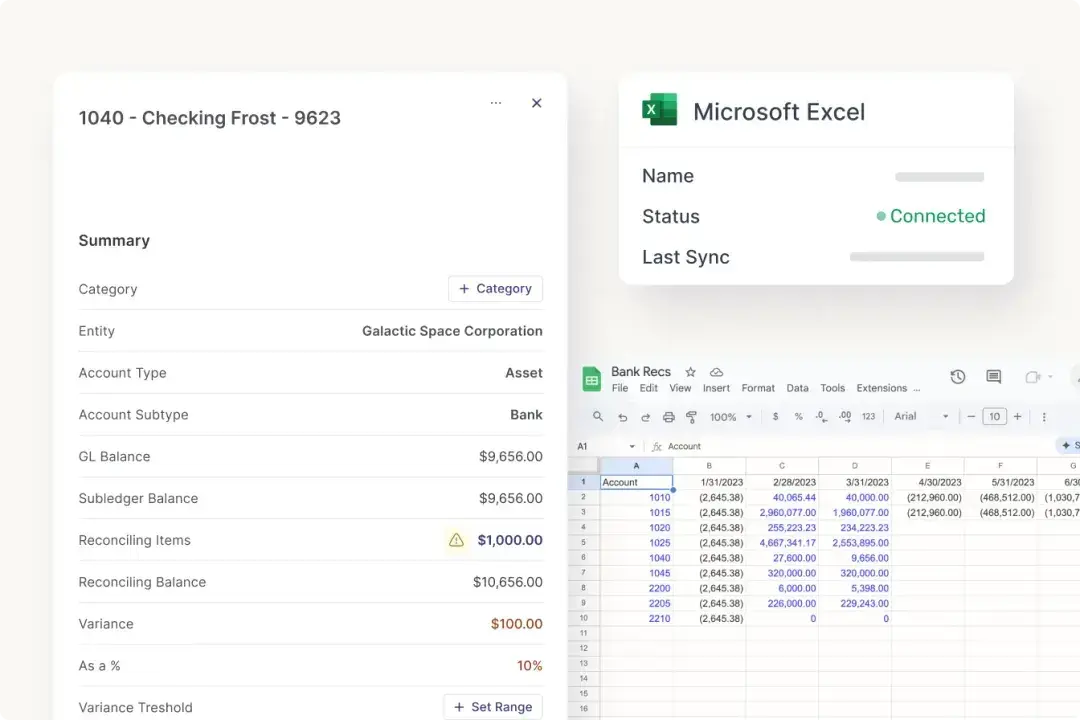
Its deepest integration is with NetSuite, where it works at the transaction level and posts approved journals back.
Numeric describes its QuickBooks, Xero, and Sage Intacct integrations at the trial-balance level, so teams on those ledgers should get the transaction-level scope in writing.
Pros
- Grouped matching and accountant-approved rules
- Cash matching tied to the wider close
- Flags changes to signed-off ledger data
Cons
- Custom quote; older Essentials pricing no longer applies
- Full transaction-level depth is on NetSuite only
- Some users report integration errors
G2 Reviews: 4.8/5 (66 reviews)
Users appreciate Numeric for its ease of use, real-time ERP integrations, and centralized close checklists that speed up reconciliations and variance analysis, though some note minor limitations in reporting flexibility, budget-to-actual comparisons, and flux workflows.
“I really like that if a reconciliation or account has been signed off on and something changes, Numeric will show you what changed and highlight it.”
— Kelsey B., G2, December 2025
Since Numeric is a relatively new platform, it still has plenty of room for improvement before it can compete with more established platforms.
“Since Numeric is relatively new compared to FloQast or BlackLine, there are some minor areas in reporting and display that could be improved to enhance user-friendliness.”
— Eric H., Senior Accountant, G2, December 2025
Numeric is best for NetSuite finance teams that want bank matching inside a structured close.
Numeric Pricing
Numeric prices Cash Management and its close modules by quote. Don't estimate from its older Essentials plan prices, which no longer apply.
How Much Does Bank Reconciliation Software Cost?
Bank reconciliation software costs anywhere from nothing to a custom enterprise quote.
Zoho's Free plan handles manual reconciliation at $0, most small-business plans cost under $100 a month, and HighRadius and Numeric need quotes that often sit on top of an ERP subscription.
Always check what a price includes: Zoho's bank feeds start on Standard, and Xero's Early plan charges $5 extra for automatic reconciliation.
What Would 25 Clients Cost an Accounting Firm?
Take a US firm keeping the books for 25 unrelated small businesses, each with two bank accounts and simple USD bookkeeping. The yearly subscription cost works out like this:
One subscription or entity per client. Eleven includes its 15% discount for 20 to 49 entities. Firm-billed QuickBooks assumes all 25 qualify for the ongoing 30% ProAdvisor discount. Xero and Zoho at regular published rates.
The plans differ. QuickBooks’ Simple Start allows one billable user per company, Zoho Standard includes three users per organization, and Xero Early caps invoices and bills.
Eleven and Xero include unlimited users. Price the portfolio using the plan each client actually needs, not the cheapest one.
What Should You Look For in Bank Reconciliation Software?
Look at how the software handles your own messy records, not a demo where every transaction matches. Test these five things before you sign:
The most reliable test is to reconcile the same month in your current and new system and compare the results. If they differ, find out why before you rely on the new one. While you're at it, check what you can export if you ever leave.
Reconcile Every Client Account in One Place With Eleven
If your firm reconciles books for dozens of clients, the hard part isn't any single statement. It's switching between separate files, logins, and subscriptions for every client, every month.
Eleven puts every client entity in one cloud platform with its own ledger, so your team reconciles client after client from a single login. You get AI extraction for PDF bank statements, suggested matches your accountants confirm, unlimited users, and per-entity pricing that drops as your client list grows.
Bring your busiest client account to the test. Try Eleven free and reconcile last month's statement before your next close.
Frequently Asked Questions (FAQs)
What's the best bank reconciliation software for small businesses?
QuickBooks Online, Xero, and Zoho Books are the strongest starting points. QuickBooks has a classic statement workflow and report, Xero can reconcile high-confidence lines automatically, and Zoho combines flexible rules with low prices.
Is there free bank reconciliation software?
Yes. Zoho Books' Free plan includes manual bank reconciliation for businesses with up to $50,000 in annual revenue, though bank feeds start on its paid Standard plan.
Excel also works for a small number of transactions if you're willing to run the matching yourself.
Can bank reconciliation software reconcile every transaction automatically?
No. Xero and others can automatically handle high-confidence matches, but unusual payments, missing records, and timing differences still need an accountant, and someone has to confirm the statement balance.
Do accounting firms need separate bank reconciliation software?
Usually not, if their accounting software already reconciles well. A specialist tool makes sense when volume, matching complexity, or review controls outgrow what the ledger can handle.
What's the difference between bank reconciliation and account reconciliation software?
Bank reconciliation software compares bank activity with the books. Account reconciliation software covers other balance sheet accounts too, such as receivables, accruals, prepaid expenses, and intercompany balances. Some platforms do both.
Disclaimer: Eleven publishes this comparison and appears in it. We used vendor documentation, published pricing, and G2 and Capterra reviews, and we show where cheaper tools beat Eleven on price. Prices and ratings checked November 20, 2026.
Was this article helpful?
Thank you! Your feedback has been received!
Oops! Something went wrong while submitting the form.