

8 Best Bank Reconciliation Software in 2026 Compared by Use Case
Home
/
Blog
/
Automated Bank Reconciliation Explained With Examples (2026)
Automated Bank Reconciliation Explained With Examples (2026)
Written by
Reviewed by
How automated bank reconciliation works step by step, with a worked example, AI vs. rule-based matching, the main risks, and multi-entity setup.
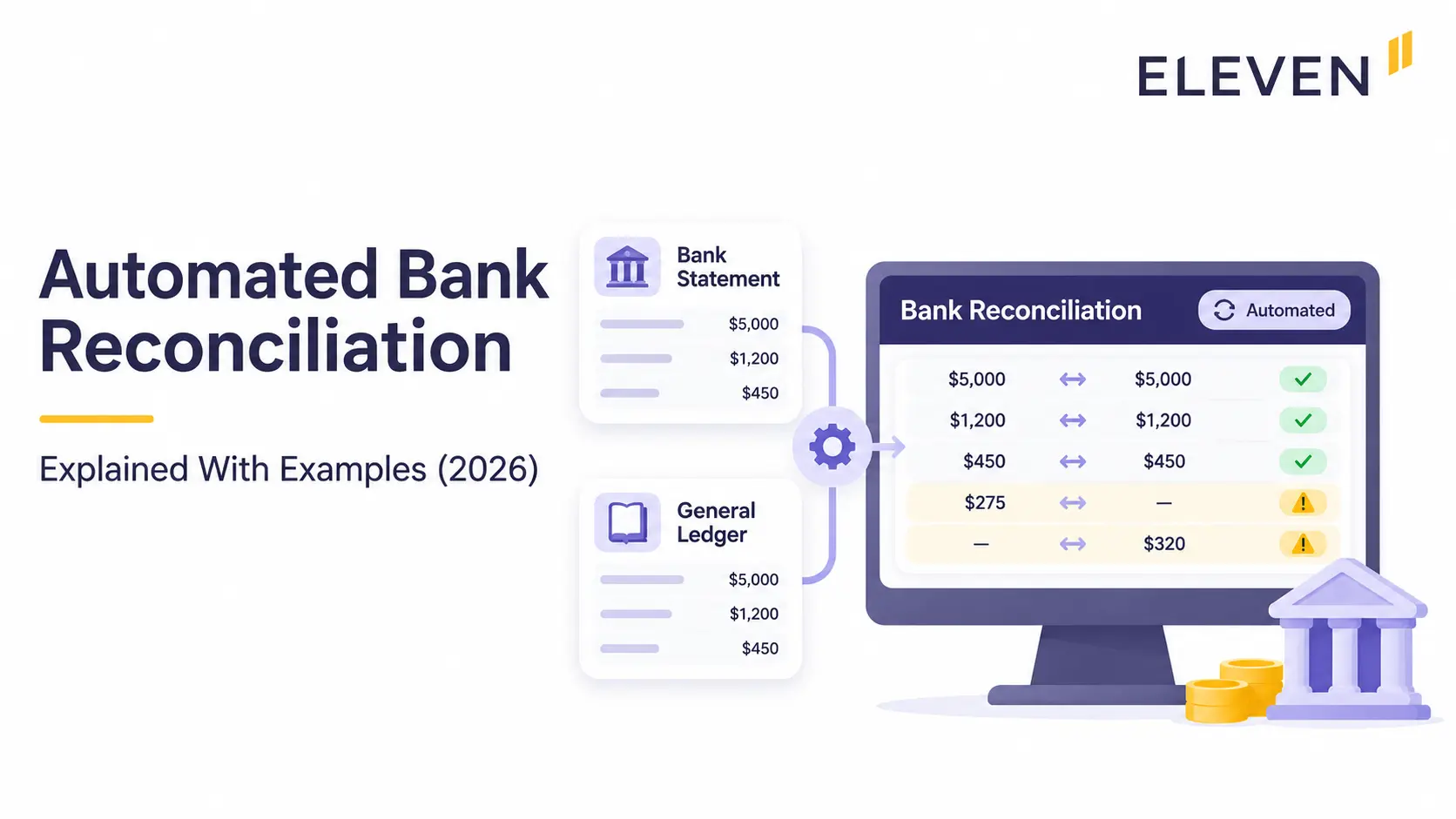
Automated bank reconciliation uses software to import bank data, propose matches against the ledger, and flag exceptions, but an accountant still proves the balance and explains every difference. This guide walks through the five steps, compares manual, rule-based, and AI-assisted matching, and reconciles a worked example from a $15 gap to an agreed balance.
For decades, bank reconciliation meant staring at two screens (or worse, two printed pages) with a highlighter, hunting for the one $45 discrepancy keeping the books from closing.
Automated bank reconciliation solves this bottleneck. It uses software to compare your bank transactions with your books, match the entries that agree, and flag the ones that don't. Instead of ticking off every line, the accountant only works through the exceptions.
But what automation doesn't do is finish the job for you. Someone still has to prove that the bank balance and the book balance agree, and explain every difference between them.
Here’s how that process works and where AI fits.
What Is Automated Bank Reconciliation?
Automated bank reconciliation is the use of software to match bank statement transactions against accounting records and highlight the differences.
In a manual reconciliation, an accountant compares each deposit and payment on the statement with the cash account in the general ledger.
Automation imports the bank data and proposes the matches, so the accountant only handles the exceptions.
Say a customer pays a $2,500 invoice. The deposit appears on the bank statement, and the receipt is already in the books. The software spots the likely match from the amount, reference, and date, and the accountant confirms it.
Accounting software tends to bundle four separate activities under "reconciliation," and it helps to pull them apart:
You can import, categorize, and match every transaction and still not have a reconciled account. Matching doesn't prove that the period's records are complete or correct.
How Does Automated Bank Reconciliation Work?
Automated bank reconciliation runs in five steps, from importing the bank data to signing off the balance. Software does most of the work in the first three; the last two stay with the accountant.
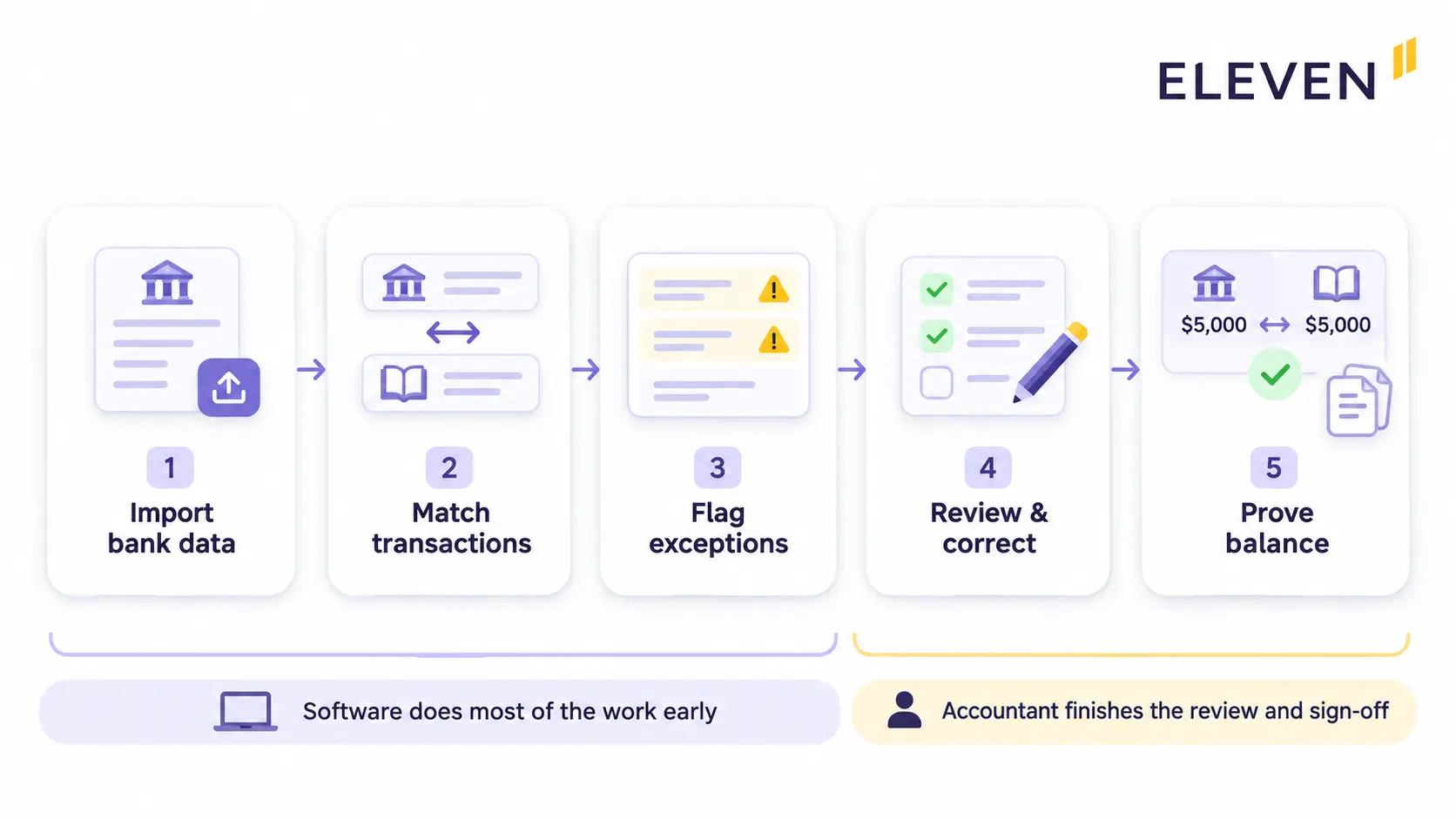
1. Import the bank data
Transactions arrive through a direct bank feed or an uploaded statement, usually a CSV or PDF. Before going further, check that the import covers the right period and the right account.
Feed coverage and refresh timing vary by bank, and uploading a statement that overlaps an existing feed is the most common way to end up with duplicates.
2. Match transactions to the books
The software compares each bank line with entries in the ledger. Platforms use different methods, often in combination:
Good matching allows for small differences. An $850 supplier payment issued November 27 might clear the bank on November 28, and software that checks the reference and allows a short date window will still catch it.
Some deposits shouldn't be matched one-to-one at all. If a payment processor deposits $1,950 after taking $50 in fees from $2,000 of customer payments, reconcile the deposit against the underlying payments and the fee rather than forcing it onto a single $1,950 invoice.
3. Flag what doesn't match
Anything that fails the matching conditions lands on an exception list. These are the usual suspects:
Not every exception is an error. A deposit recorded November 30 that the bank processes December 1 is a deposit in transit, a normal timing difference. You note it; you don't record it again.
4. Review and correct
Some platforms accept high-confidence matches automatically, while others wait for the accountant to confirm.
Either way, the judgment calls need a person. Two $1,200 supplier payments in the same week look identical by amount, and matching the wrong one closes one invoice while leaving the other open. Check the references before accepting.
When an investigation turns up a real error, fix the accounts. A missing bank charge needs an expense entry, and a payment posted to the wrong customer needs to be reversed and reposted.
5. Prove the balance and keep the evidence
The reconciliation is done when the adjusted bank balance equals the adjusted book balance and every difference has an explanation.
Keep the statement, the ledger activity, the outstanding items, any adjustments, and a record of who reviewed it. The IRS recordkeeping guidance describes the same routine: compare the statement with your books, account for outstanding items, and correct errors.
Remember that a list of matched transactions isn't a completed reconciliation. Until the balances agree and the differences are explained, the account isn't reconciled.
How Is AI-Assisted Reconciliation Different From Rule-Based Automation?
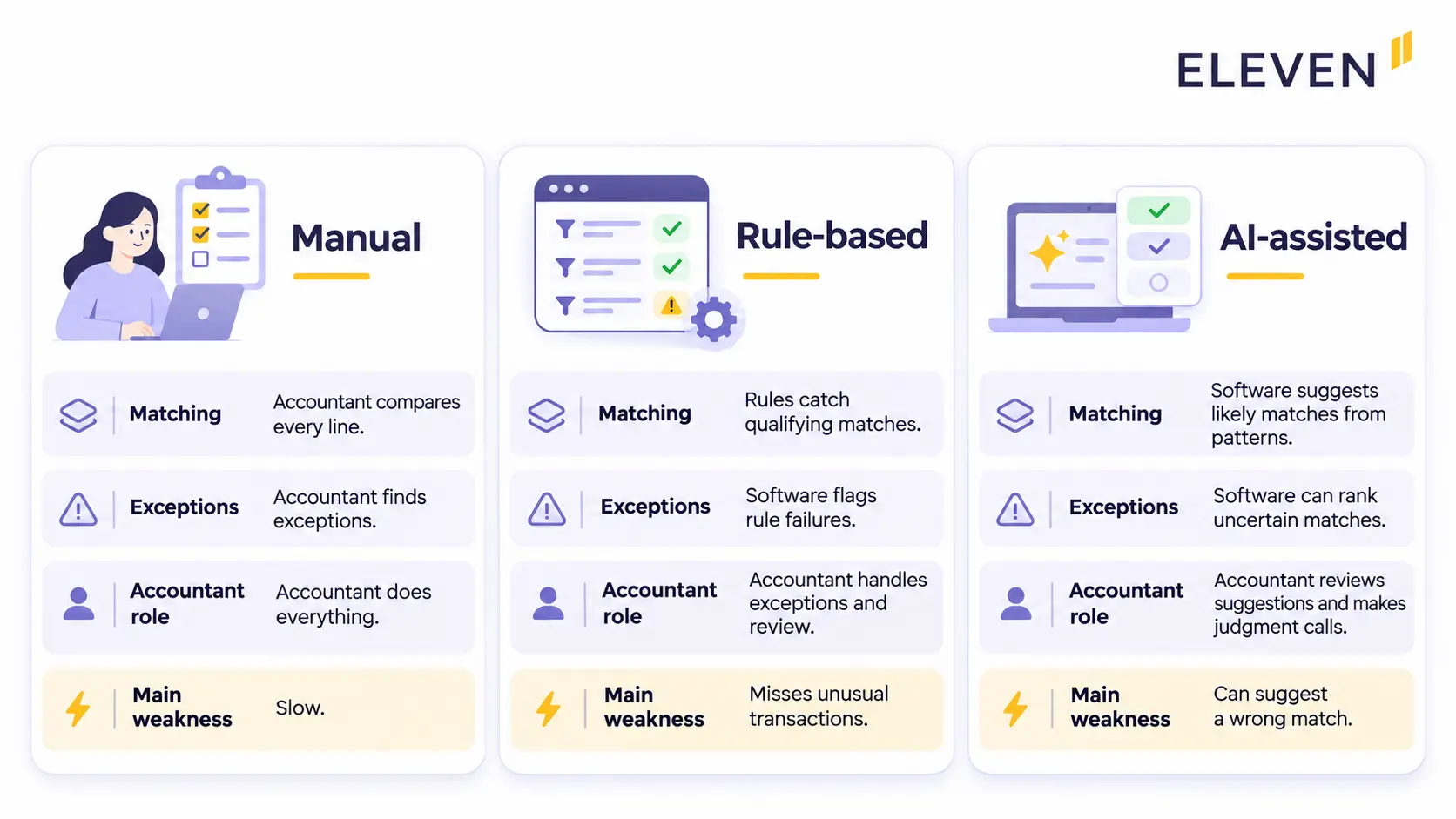
Rules work on fixed conditions, while AI suggests matches from patterns in your transaction history. The three approaches compare like this:
For recurring transactions with clean references, rules do the job without any AI. AI helps when descriptions vary and no rule produces a clear candidate.
Products also differ in how much they let the software decide. Eleven, for example, suggests matches and waits for an accountant to confirm each one.
Whatever the tool, accept a match only when you can say why it's right. In the Journal of Accountancy's look at four small CPA firms using AI, the firms kept a person checking the output rather than trusting it outright.
What Does an Automated Bank Reconciliation Look Like in Practice?
Let’s look at Cedar Design LLC, a fictional small business. It’s reconciling its operating account for November 2026.
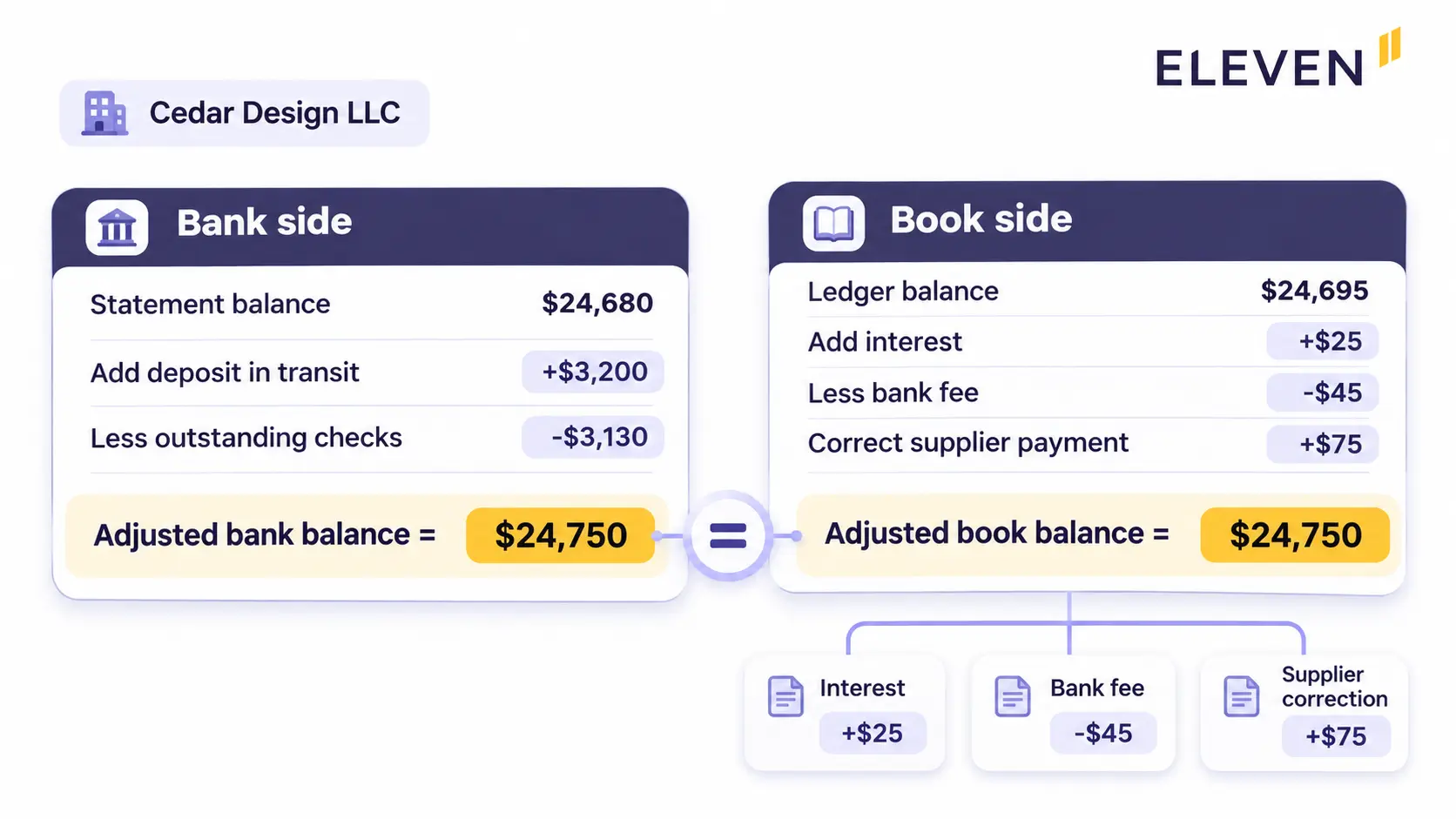
The bank statement closes at $24,680, and the general ledger shows $24,695. The accountant's investigation turns up five items:
- A $3,200 deposit recorded November 30 that the bank processed December 1
- Two outstanding checks totaling $3,130
- $25 of bank interest that hasn't been recorded
- A $45 bank fee that hasn't been recorded
- A supplier check recorded at $690 that was actually written for $615
The first two are timing differences on the bank side. The last three need corrections in the books.
How Do the Two Balances Reconcile?
Adjusting each side for its own items brings both to the same figure:
The deposit in transit and the outstanding checks are already recorded correctly, so they don't need new entries. Only the book-side items need entries:
The $75 correction assumes the original error also overstated supplies expense. Together, the three entries raise book cash by $55, which closes the gap.
This is the standard bank-and-book method taught in OpenStax's Principles of Financial Accounting.
With automation, the software would have imported the statement, matched the routine items, and flagged the fee, the interest, and the $75 difference. That removes most of the comparison work.
It shouldn't create a second $3,200 receipt because the deposit is missing from the November statement, and it shouldn't book the $75 as an unexplained plug. Those decisions still belong to the accountant.
What Are the Benefits of Automated Bank Reconciliation?
The main benefit of automated bank reconciliation is time. When software clears the routine matches, accountants spend their hours on exceptions instead of comparing lines. How much time you save depends on the quality of the bank data and how many exceptions remain.
For a sense of scale, technology implementer GraVoc reported that an HVAC business with about 250 transactions per statement cut monthly reconciliation from more than eight hours to under 45 minutes, using a custom bank import and Microsoft Dynamics 365 Business Central. That's one implementer's result, not a typical saving.
Accounting automation also surfaces problems sooner. With bank data coming in daily, a missing payment shows up while the invoice is still fresh, not three weeks later at month-end. And because the same rules and review steps run every period, reconciliations become more consistent.
Both depend on good inputs: a lagging feed hides problems, and a badly configured rule repeats the same mistake every month.
Reliable cash records are one of the first things the month-end close needs, so less matching work leaves more time to clear outstanding items before the deadline.
Automation won't rescue a close that's missing a statement period or starting from the wrong opening balance, though.
What Are the Risks of Automating Bank Reconciliation?
Most risks come from bad source data or from accepting matches without checking them:
The easiest risk to miss is a reconciliation that balances but is still wrong. Two errors can cancel each other out, or a real payment can be matched to the wrong customer without changing the cash total.
That's why the share of auto-matched transactions says little about quality on its own. What matters is whether the matches are correct and the exceptions are resolved.
How Do You Reconcile Bank Accounts Across Multiple Entities?
Reconcile each entity on its own, because a combined total can balance while the individual books are wrong.
Accounting firms with many clients and family offices with several holding companies run into this most. Take a firm keeping the books for three unrelated clients:
Aster and Harbor add up to $15,000 on both the bank and book sides, yet neither ledger is right. The fix is to reverse the $1,000 receipt out of Aster's books, record it against Harbor's receivable, and book Maple's $30 fee separately.
Related entities are another consideration. A transfer between two companies in the same group may need matching due-to and due-from entries, which is intercompany accounting, a separate task from bank reconciliation.
In the same way, reconciling a family office's bank accounts isn't the same as reconciling custodian positions or preparing consolidated statements. Our guide to multi-entity accounting covers the broader setup.
How Do You Set Up an Automated Bank Reconciliation Process?
Start with clean books and clear responsibilities, then connect the feeds. In order:
- Confirm the last reconciliation is complete and outstanding items carry forward correctly.
- Map every bank account to the right entity, general ledger account, and currency.
- Test the matching on a statement with known routine items and known exceptions.
- Decide who investigates exceptions, who approves corrections, and who signs off the balance.
- Run the old and new process side by side for at least one period, and explain any differences.
The side-by-side run matters most when you're changing accounting software at the same time.
After go-live, watch the unresolved exceptions, not just the match rate. An account that matches 95% of its lines automatically can still hold one large difference nobody has explained.
Can You Automate Bank Reconciliation in Excel?
Partly. If your bank and ledger exports use consistent formats, Power Query can import both and merge them on matching fields, leaving the transactions that appear in only one source. Excel University has a worked reconciliation example.
The limits show up with duplicate amounts: two equal figures aren't proof of the same payment, so you still investigate by hand. Excel works for a small, predictable account.
Once you're reconciling many accounts or entities, matching inside the accounting system saves rebuilding the workbook every month.
In Eleven, transactions come in through bank feeds or uploaded statements, and Eleven proposes a match for each bank line based on the amount, date, payee, and how similar transactions were matched before. A suggested match rests on more than the figure, which is exactly where a Power Query merge falls short.
An accountant still reviews and confirms each suggestion, and Eleven flags partial or ambiguous matches for a closer look. Nothing posts without that confirmation, and because each client entity keeps its own ledger in the same platform, you reconcile them one after another without opening a separate workbook for each.
Still Ticking Off Bank Lines by Hand? Let Eleven Do the Matching
Matching is the slowest part of reconciliation, and it's the part software handles best. Eleven runs it inside each entity's books, so a firm reconciling dozens of client accounts works from one place instead of one file per client.
Statements come in through connected bank feeds, PDF uploads, or a CSV template. For PDFs, Eleven's AI extracts the transactions, and you check them before they reach the banking workflow.
Eleven then suggests matches based on amount, date, payee, and past patterns. Your accountant confirms each one, picks a different transaction, or creates the missing entry when the records support it, and still signs off the final balance.
Every entity keeps its own ledger under one login, with unlimited users on every plan, so adding clients or accountants never means another subscription.
Bring your busiest bank account to the test. Try Eleven free and reconcile last month's statement in Eleven before your next close.
Frequently Asked Questions (FAQs)
Can bank reconciliation be fully automated?
Not entirely. Software can import data, match clear transactions, and in some products post entries under approved rules, but ambiguous items still need judgment, and someone has to verify the final balance.
Is transaction matching the same as bank reconciliation?
No. Matching links a bank line to its entry in the books. Reconciliation proves the account balance for the period and explains every difference, including outstanding checks, deposits in transit, and errors.
How often should you reconcile bank accounts?
At least monthly. IRS Publication 583 recommends reconciling checking accounts every month, and high-volume accounts are worth reviewing more often.
Do outstanding checks and deposits in transit need journal entries?
Not if they're already recorded correctly. They're timing differences, so you document them and confirm they clear. Unrecorded fees, interest, and genuine errors do need entries.
Does AI make bank reconciliation more accurate?
It can find matches that simple rules miss, but it can also suggest wrong ones. Judge it by how many accepted matches turn out to be correct, not by how much it automates.
Was this article helpful?
Thank you! Your feedback has been received!
Oops! Something went wrong while submitting the form.